Every time you use a computer or smartphone, multiple types of software are working together behind the scenes. You might open a web browser, edit a document, or watch a video, and these activities feel effortless because different layers of software cooperate seamlessly. Most users only interact with the applications they launch, but those applications rely on another layer of software that is already running long before the first program opens.
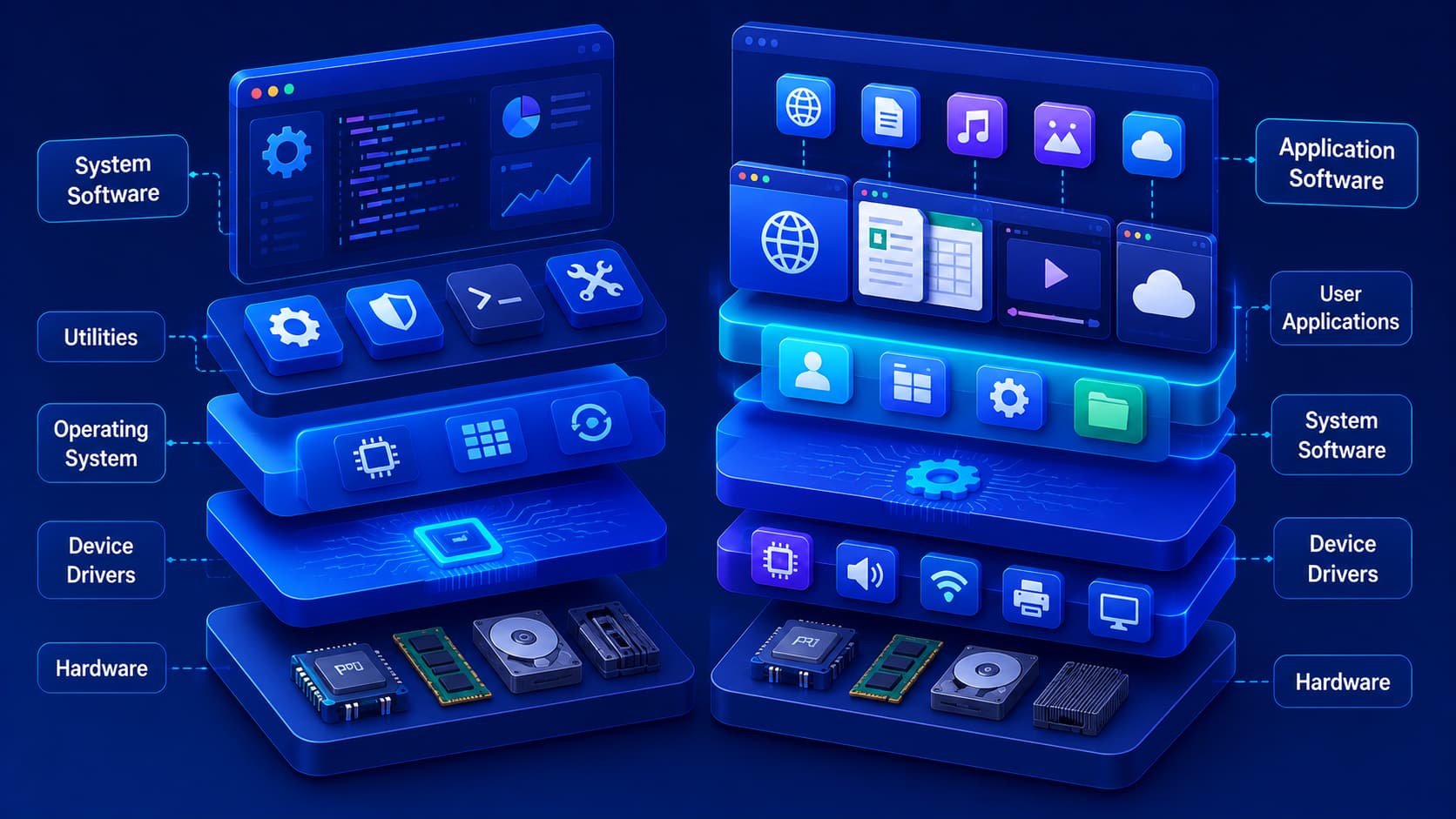
Understanding the distinction between these layers is one of the most important concepts for anyone learning about computers. These layers are known as system software and application software. Although both are essential, they serve very different purposes. System software manages the computer itself, while application software helps users perform specific tasks. Together, they create the smooth computing experience we expect from modern digital devices.
What Is System Software?
System software is responsible for operating and managing the computer. It provides the foundation that allows hardware and applications to work together. Without system software, a computer would have no effective way to communicate with its processor, memory, storage devices, keyboard, display, or network hardware.
The most familiar example of system software is the operating system, which starts when the device powers on and continues running throughout the computer's operation.
In addition to operating systems, system software also includes:
- Device drivers.
- Utility programs.
- System management tools.
- Hardware communication services.
Although users may not interact directly with these components very often, they are essential for keeping the computer stable, secure, and functional.
Practical Example
Imagine turning on a brand-new laptop.
Before you can:
- Open a web browser.
- Launch a game.
- Edit a document.
- Watch a movie.
the operating system has already loaded into memory, detected the hardware, initialized system services, and prepared the computer for use. All of this happens because of system software.
What Is Application Software?
Application software is designed to help users accomplish specific tasks. Unlike system software, which focuses on managing the computer itself, application software exists to help people complete meaningful work or enjoy digital experiences.
Examples of application software include programs used for:
- Writing documents.
- Browsing the web.
- Editing photos.
- Watching videos.
- Sending emails.
- Managing finances.
- Joining online meetings.
Each application is created with a particular purpose in mind. Some improve productivity, others provide entertainment, communication, education, or creative capabilities.
Because these are the programs users interact with every day, application software is typically the most visible part of a computing system.
Editorial Insight
When most people say they're "using the computer," they're actually referring to application software. Whether it's a browser, spreadsheet, messaging app, or video editor, these programs rely on the operating system to access hardware resources and function correctly.
How They Work Together
System software and application software are not competitors—they are partners. Each depends on the other to create a complete computing experience.
A useful analogy is a theater production:
- Application software is like the actors performing on stage.
- System software is like the backstage crew managing lighting, sound, and technical operations.
The audience mainly notices the actors, but the performance would not be possible without the support provided behind the scenes. Likewise, applications depend on the operating system and other system software to access hardware resources and perform their work.
Practical Example
Suppose you open a presentation application.
While you focus on creating slides, the operating system is simultaneously:
- Managing system memory.
- Communicating with the keyboard and mouse.
- Saving files to storage.
- Updating the display.
- Controlling network connections if cloud storage is used.
The application performs the visible task, while the system software quietly manages the resources that make everything possible.
Why Both Types Are Essential
A computer with only system software would be able to manage hardware but would provide very few practical tools for everyday users. On the other hand, application software cannot function without the services provided by system software. One layer creates the environment, while the other delivers the functionality users actually need. Together, they make modern computers, smartphones, tablets, and other digital devices remarkably versatile.
Examples of System Software
Although system software works mostly behind the scenes, it performs many essential functions that keep a computer operating smoothly and reliably. Several different types of system software work together to manage hardware and provide the environment required by applications.
Operating Systems
An operating system is the best-known example of system software. It manages the computer's hardware resources and provides the platform on which applications run.
Its responsibilities include:
- Managing memory.
- Controlling storage devices.
- Coordinating processor resources.
- Managing file systems.
- Handling user interactions.
- Coordinating communication between hardware and software.
Without an operating system, using a modern computer would be extremely difficult because applications would have no standardized way to communicate with hardware.
Practical Example
When you save a document, you don't need to know where the file is physically stored on the drive.
Instead, the operating system automatically:
- Organizes the file.
- Writes data to storage.
- Updates the file system.
- Makes the document available the next time you open it.
This simplifies everyday computing by hiding complex hardware operations from the user.
Device Drivers
A device driver is a specialized type of system software that allows the operating system to communicate with specific hardware components. Each driver acts as a translator between the operating system and the hardware device it controls.
Examples of hardware that relies on device drivers include:
- Printers.
- Graphics cards.
- Keyboards.
- Network adapters.
- Storage devices.
Without the appropriate driver, the operating system may not be able to recognize or fully utilize the hardware's capabilities.
Editorial Insight
Many hardware problems that appear to be physical failures are actually caused by outdated, missing, or incompatible drivers. Keeping drivers updated helps maintain compatibility, improve stability, and ensure hardware performs as expected.
Utility Software
Utility software helps maintain, optimize, and protect a computer system. Although users may only open these tools occasionally, they play an important role in preserving overall system health.
Examples include:
- Disk management tools.
- Backup utilities.
- File compression software.
- Security utilities.
These tools often perform maintenance tasks that improve reliability and make managing the computer easier over time.
Examples of Application Software
Application software is much more visible because it is designed for everyday use. Different applications are created to solve different problems or support specific activities.
Productivity Software
Productivity applications help users complete everyday work more efficiently. They are commonly used in homes, schools, and businesses.
Typical examples include software for:
- Writing documents.
- Creating spreadsheets.
- Building presentations.
- Taking notes.
- Managing projects.
These applications focus on improving organization, collaboration, and workplace efficiency.
Communication Software
Communication software enables people to stay connected regardless of location. It supports both personal and professional collaboration through digital communication tools.
Common examples include:
- Messaging applications.
- Email clients.
- Video conferencing platforms.
- Team collaboration tools.
These applications have become essential for remote work, online learning, and global communication.
Creative Software
Creative software supports professionals, students, and hobbyists who produce digital content.
Examples include:
- Graphic design software.
- Video editing applications.
- Music production software.
- 3D modeling tools.
These applications provide specialized features for creating visual, audio, and multimedia projects.
Entertainment Software
Entertainment software focuses on recreation and media consumption.
Examples include:
- Streaming platforms.
- Media players.
- Video games.
Although designed primarily for entertainment, many of these applications also incorporate communication, creativity, and social interaction features.
Can One Device Run Without Application Software?
Technically, yes.
A computer can boot into its operating system and perform basic system functions even without additional applications installed. However, most users would find it difficult to accomplish meaningful work. Without application software, there would be no web browser, office suite, messaging platform, media player, or photo editor.
Likewise, installing application software without a functioning operating system would not work because applications depend on system software to access hardware and other essential system resources. Both layers are necessary for a complete computing experience.
Best Practice
When troubleshooting software issues, determine whether the problem originates from the application itself or the system software beneath it. Distinguishing between these two layers often makes diagnosing and resolving problems much easier.
Common Misconceptions
Understanding the distinction between system software and application software becomes easier once a few common misconceptions are cleared up. Many users assume every program installed on a computer belongs to the operating system, or that applications can work independently of the system software beneath them.
The Operating System Is Not Every Piece of Software
Some people assume that everything installed on a computer is part of the operating system. In reality, the operating system is only one type of system software. Most applications installed later operate independently while relying on the operating system for essential services.
For example:
- Windows, macOS, and Linux are operating systems.
- A web browser is application software.
- A photo editor is application software.
- A video conferencing tool is application software.
Although applications depend on the operating system, they are separate programs with different purposes.
Editorial Insight
This misconception often arises because applications appear to be part of the operating system's interface. While they may look integrated, they are independent programs that simply use the services provided by the operating system.
Applications Cannot Replace System Software
Even the most advanced application cannot manage hardware directly without support from the operating system. System software provides the environment that applications need to function safely and efficiently.
Without system software, applications cannot properly:
- Access memory.
- Read or write files.
- Communicate with hardware.
- Use networking resources.
- Display information on the screen.
The operating system acts as an intermediary between applications and hardware, ensuring that system resources are shared efficiently and securely.
System Software Doesn't Mean "Invisible"
Although much of system software operates quietly in the background, users regularly interact with it through settings, file managers, update tools, and system configuration panels. Not every part of system software is hidden from view.
Everyday examples include:
- Opening the Settings application.
- Managing storage.
- Installing operating system updates.
- Configuring network connections.
These tasks all involve interacting with components of the system software.
Frequently Asked Questions
What Is the Main Difference Between System Software and Application Software?
System software manages the computer and its hardware, while application software helps users perform specific tasks such as browsing the web, editing documents, or communicating online.
Is an Operating System Considered System Software?
Yes.
An operating system is one of the most important examples of system software because it manages hardware resources and provides the platform required for running applications.
Can Application Software Run Without System Software?
No.
Application software depends on system software to access hardware, memory, storage, networking, and other essential system resources.
Which Type of Software Do Users Interact With Most?
Most users spend the majority of their time interacting with application software, while system software operates largely behind the scenes to keep the computer functioning correctly.
Why Do Both Types of Software Matter?
System software provides the foundation for computing, while application software enables users to accomplish practical tasks. Together, they create the complete computing experience that people rely on every day.
Conclusion
System software and application software serve different but equally important purposes. System software manages the computer itself by coordinating hardware resources and creating the environment that applications need to operate. Application software builds on that foundation by helping users complete everyday activities, from browsing the internet and editing documents to communicating with others and creating digital content.
Understanding this distinction makes it easier to see how modern computers function as layered systems rather than collections of unrelated programs. Instead of working independently, both software categories cooperate continuously to provide a reliable, efficient, and user-friendly computing experience.
Final Takeaway
A computer becomes truly useful because system software and application software work together. The operating system manages hardware, allocates resources, and provides essential services, while applications allow users to perform meaningful tasks such as creating documents, browsing the web, editing media, and collaborating with others.
Recognizing the different responsibilities of these two software layers provides a strong foundation for learning more advanced topics, including operating systems, software development, cybersecurity, and computer architecture.