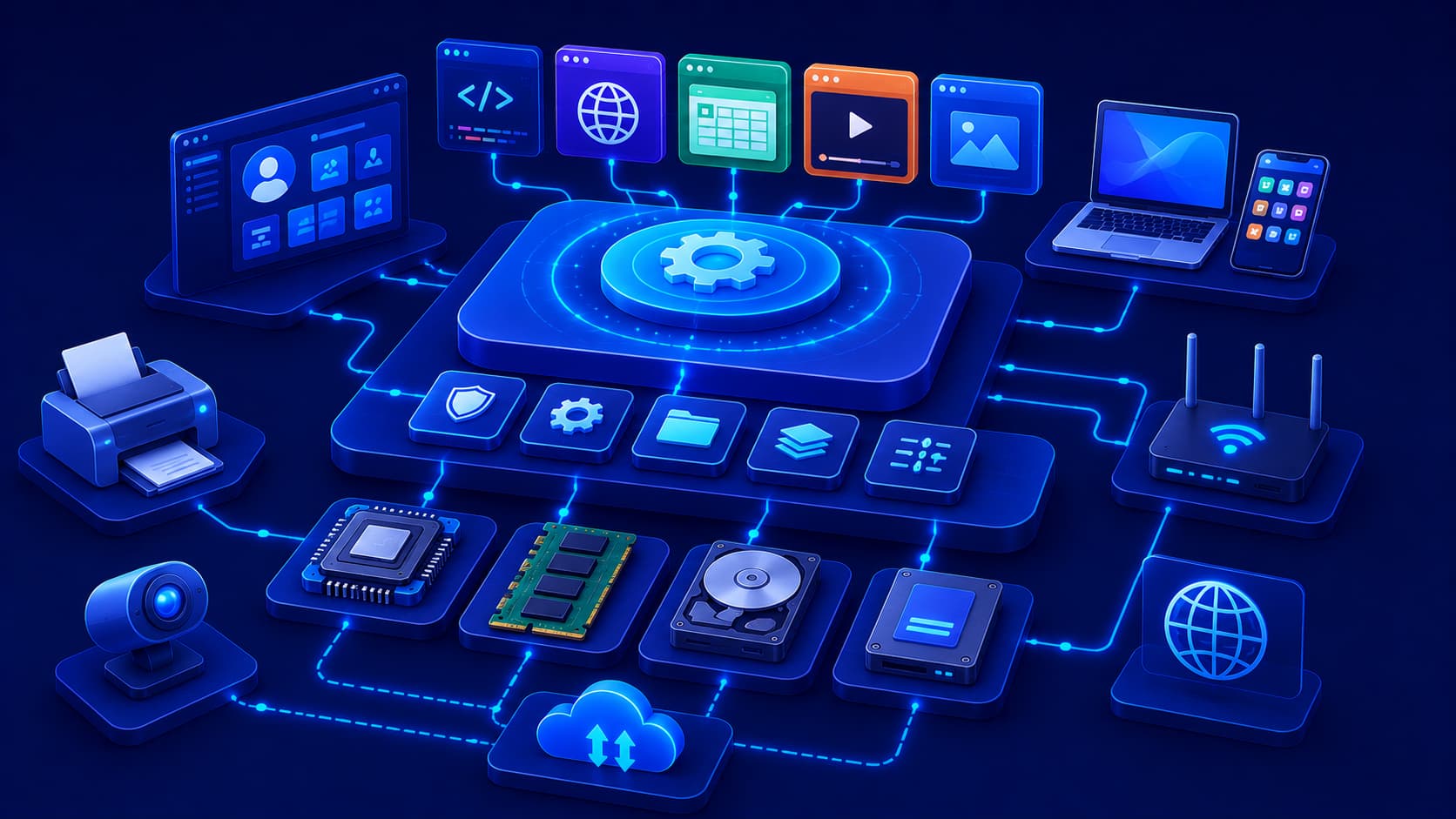
Every time you turn on your computer or unlock your smartphone, one piece of software begins working long before any application appears on the screen. You rarely notice it while checking email, browsing the web, or watching videos, yet without it, none of those activities would be possible. This essential software is called the operating system (OS).
An operating system serves as the bridge between hardware and software. It manages the computer's resources, coordinates communication between different components, and provides the environment applications need in order to run. Without an operating system, users would have to control hardware directly, manage memory manually, and coordinate every device themselves. Instead, the operating system performs these complex tasks automatically, allowing people to focus on using their devices rather than managing them.
What Is an Operating System?
An operating system is a type of system software that manages a computer's hardware and provides services for application software. It acts as the central coordinator for the entire system, ensuring that hardware and software work together efficiently.
Whenever an application needs to:
- Access memory.
- Read or write data to storage.
- Connect to the network.
- Receive input from a keyboard, mouse, or touchscreen.
…it communicates through the operating system. The OS determines how these requests are handled and ensures that multiple programs can safely share the computer's resources.
Without this coordination, modern computers would be unstable, inefficient, and far more difficult to use.
Practical Example
Imagine opening a web browser while listening to music and downloading a large file.
The operating system automatically:
- Allocates processor time.
- Assigns memory to each application.
- Manages storage access.
- Coordinates network activity.
To the user, everything appears to work simultaneously, even though the operating system is carefully managing every resource behind the scenes.
Why Is an Operating System Important?
The operating system makes computers practical for everyday use. Instead of requiring users to understand complex hardware details, it provides a consistent environment where applications can run safely and efficiently.
It also prevents different programs from interfering with one another by controlling access to shared system resources.
As a result, users can:
- Switch between applications.
- Save and organize files.
- Connect to networks.
- Use printers, cameras, and other peripherals.
- Work without worrying about hardware management.
This layer of abstraction is one of the primary reasons modern computers are both powerful and user-friendly.
Editorial Insight
Most users never think about the operating system unless they install updates or troubleshoot problems. In reality, every click, tap, file transfer, and application launch depends on the operating system coordinating dozens of hardware and software processes in the background.
Core Responsibilities of an Operating System
Although operating systems include many advanced capabilities, their core responsibilities generally fall into several major areas.
Resource Management
One of the operating system's most important jobs is deciding how processor time, memory, storage, and other hardware resources are allocated among running applications. This ensures multiple programs can operate smoothly at the same time without competing for resources in a way that causes instability.
File Management
Operating systems organize files and directories so users and applications can efficiently store, retrieve, move, rename, and delete information. Without effective file management, keeping track of digital data would quickly become confusing and inefficient.
Device Management
Computers communicate with many different hardware devices, including displays, keyboards, printers, storage drives, cameras, and network adapters. The operating system coordinates communication with these devices, allowing applications to use hardware without understanding the technical details of each component.
User Interface
Most modern operating systems provide graphical user interfaces (GUIs) that allow users to interact with computers using windows, icons, menus, buttons, and touch controls. Many operating systems also support command-line interfaces (CLIs), which offer more direct control for advanced users and system administrators.
How Operating Systems Work
Although operating systems perform many complex tasks internally, their primary role is straightforward: they act as the central manager of the computer. Whenever an application starts, the operating system loads the required files into memory, assigns processor time, and provides controlled access to hardware resources.
As multiple applications run simultaneously, the operating system coordinates their activities to prevent conflicts and keep the system responsive. Instead of allowing every application to communicate directly with hardware, the operating system serves as an intermediary between software and physical components. This approach improves security, stability, and efficiency while also making software development much easier.
Practical Example
Suppose you launch a photo editing application.
Before you can edit a single image, the operating system has already:
- Loaded the application's files into memory.
- Assigned processor resources.
- Granted access to storage devices.
- Connected the application to your keyboard, mouse, and display.
- Managed communication with the graphics hardware.
All of these processes happen automatically within seconds, allowing the application to function smoothly without requiring the user to configure hardware manually.
Multitasking
One of the most valuable features of modern operating systems is multitasking. Users expect to browse the web while listening to music, downloading files, receiving notifications, and editing documents at the same time. The operating system makes this possible by rapidly switching processor time between running applications.
Although it appears that every application is running simultaneously, the operating system carefully schedules tasks to create a smooth and responsive user experience.
Benefits of multitasking include:
- Running multiple applications simultaneously.
- Switching quickly between active programs.
- Improving productivity.
- Keeping background services active while users continue working.
Editorial Insight
Multitasking doesn't mean every application is using the processor continuously. Instead, the operating system allocates tiny slices of processor time to each task so quickly that users experience smooth, uninterrupted performance.
Security and User Management
Operating systems also play a critical role in protecting computers and user data. They manage user accounts, control access permissions, and help prevent unauthorized software from accessing sensitive information.
Modern operating systems typically include security features such as:
- User authentication.
- File permissions.
- Application isolation.
- Encryption support.
- Security updates.
While no operating system can eliminate every security risk, these built-in protections provide an essential foundation for maintaining system security and reducing the likelihood of accidental damage or malicious attacks.
Best Practice
Always install operating system security updates from official sources. These updates frequently address newly discovered vulnerabilities and help keep your device protected against emerging threats.
Examples of Operating Systems
Many operating systems exist today, each designed for different devices and use cases. Some are intended for personal computers, while others power smartphones, servers, embedded systems, or cloud infrastructure.
Although their interfaces and features vary, they all share the same fundamental responsibilities:
- Managing hardware.
- Running applications.
- Organizing files.
- Coordinating system resources.
- Providing a user interface.
Rather than memorizing the features of individual operating systems, it is more valuable to understand the common responsibilities they all perform. These core functions remain largely consistent regardless of the device or platform.
Operating Systems Continue to Evolve
Operating systems are continuously improving. Developers regularly release updates that introduce new features, improve performance, strengthen security, and enhance compatibility with newer hardware.
As technology evolves, operating systems also adapt to support emerging innovations such as:
- Cloud computing.
- Virtualization.
- Artificial intelligence.
- More powerful processors.
- New hardware technologies.
This ongoing development allows computers, smartphones, and other digital devices to remain useful and secure for many years after their initial release.
Common Misconceptions About Operating Systems
Although operating systems are used every day, several misconceptions often lead to confusion about what they actually do and how they relate to other software. Understanding these misunderstandings makes it easier to appreciate the operating system's role in modern computing.
The Operating System Is Not the Entire Computer
Some people think the operating system and the computer are the same thing. In reality, the operating system is software that manages the computer's hardware. The computer itself also consists of physical components such as the processor, memory, storage, and display.
A simple way to think about it is:
- The computer is the complete system.
- Hardware provides the physical components.
- The operating system manages those components.
- Applications allow users to perform specific tasks.
Each layer has a different responsibility, and all of them are necessary for a fully functional computer.
Editorial Insight
When people say, "My computer isn't working," the problem could involve the hardware, the operating system, or a specific application. Recognizing these as separate layers makes troubleshooting much more effective.
Applications Are Not Part of the Operating System
Applications run on top of the operating system rather than being part of it. Although many operating systems include built-in utilities, most software that users install operates independently while relying on the operating system for essential services.
Examples of application software include:
- Web browsers.
- Office suites.
- Video editors.
- Messaging applications.
- Games.
These applications depend on the operating system for tasks such as memory allocation, file access, networking, and communication with hardware.
Faster Hardware Doesn't Eliminate the Need for an Operating System
Even the most powerful processor cannot manage hardware resources, schedule applications, organize files, or provide a usable interface by itself. These responsibilities remain the job of the operating system.
A faster processor may improve performance, but it cannot replace the coordination, security, and resource management performed by the operating system.
Frequently Asked Questions
What Is an Operating System in Simple Terms?
An operating system is system software that manages hardware resources and provides the environment needed for applications to run.
It serves as the bridge between hardware and application software, making computers practical and easy to use.
Why Does Every Computer Need an Operating System?
Without an operating system, users would need to communicate directly with hardware, making computers extremely difficult to operate. The operating system automates these complex tasks so applications can function smoothly.
Is an Operating System Considered Software?
Yes.
An operating system is one of the most important examples of system software because it manages hardware resources and provides the platform required for running applications.
Can One Computer Have More Than One Operating System?
Yes.
Some computers are configured to support multiple operating systems, allowing users to choose which one to start when the device boots.
Why Are Operating System Updates Important?
Operating system updates improve security, fix bugs, enhance performance, and maintain compatibility with modern hardware and software.
Keeping the operating system updated helps ensure a more stable, secure, and reliable computing experience.
Conclusion
The operating system is the foundation that makes modern computing possible. By managing hardware resources, coordinating applications, organizing files, and providing user-friendly interfaces, it transforms complex electronic components into devices that people can use every day.
Although much of its work happens behind the scenes, the operating system influences nearly every interaction users have with computers, smartphones, tablets, and other digital devices. Understanding its role provides a deeper appreciation of how hardware and software work together to deliver reliable, secure, and efficient computing experiences.
Final Takeaway
The operating system is much more than just the software that appears when a device starts. It is the central platform that manages hardware, allocates resources, protects user data, and enables applications to function efficiently.
Whether you're using a desktop computer, laptop, smartphone, or server, every digital interaction depends on the operating system working continuously in the background. Understanding its responsibilities provides an essential foundation for learning more advanced topics such as file systems, device drivers, virtualization, cybersecurity, and software development.