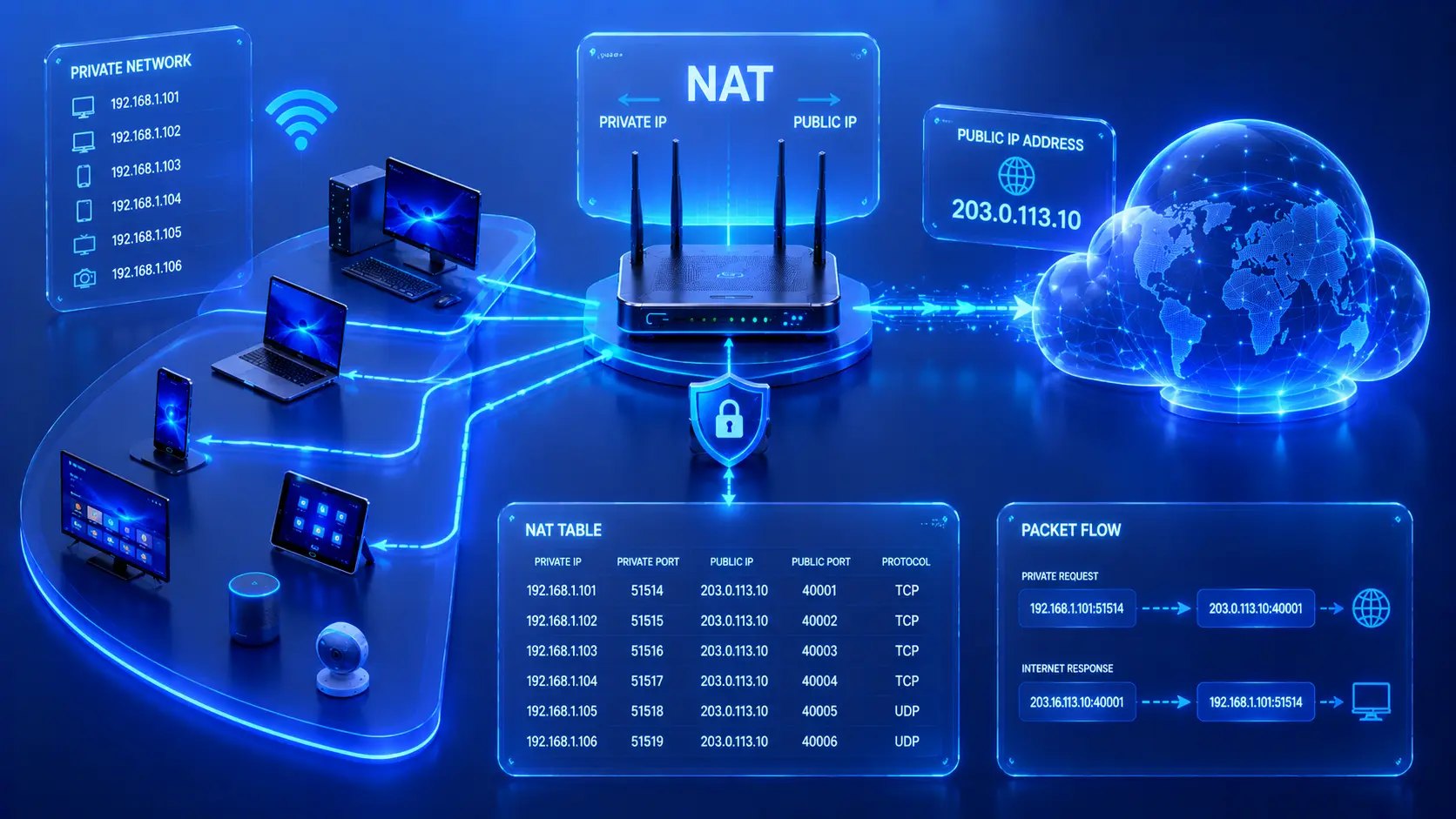
Most homes today have dozens of internet-connected devices. Laptops, smartphones, smart TVs, gaming consoles, security cameras, printers, and smart home devices all share the same internet connection. Yet despite having many devices, your Internet Service Provider (ISP) usually assigns only one public IP address to your home.
So how can all of these devices browse websites, stream videos, join online meetings, and play online games at the same time?
The answer is Network Address Translation (NAT).
NAT allows multiple devices on a private network to communicate with the internet through a single public IP address. It is one of the most important technologies in modern networking because it conserves the limited supply of IPv4 addresses while adding an additional layer of privacy between your internal network and the public internet.
What Is NAT?
Network Address Translation (NAT) is a networking process that translates private IP addresses into a public IP address whenever devices communicate with the internet.
Inside your home or office, every device uses a private IP address that cannot be accessed directly from the internet. When one of these devices sends data to a website or online service, your router temporarily replaces the device's private IP address with its own public IP address before forwarding the request.
When the response returns, the router performs the reverse translation and sends the data back to the correct device on your local network. This entire process happens automatically and is completely transparent to users.
Practical Example
Imagine three devices connected to your home Wi-Fi:
- A laptop.
- A smartphone.
- A smart TV.
Although each device has its own private IP address, websites on the internet only see your router's single public IP address. The router keeps track of which device initiated each connection so that responses are delivered to the correct destination.
Editorial Insight
A useful way to think about NAT is as a receptionist in an office building. Visitors only know the company's main address, while the receptionist ensures every message reaches the correct employee inside. Likewise, internet servers only see your router's public IP address, while NAT delivers incoming responses to the appropriate device on your local network.
Why Was NAT Created?
When IPv4 was originally introduced, the available address space appeared to be more than enough for the internet's needs. However, as billions of computers, smartphones, tablets, and smart devices came online, the limited number of public IPv4 addresses became a significant challenge.
To address this problem, engineers developed NAT so that many devices could share a single public IP address instead of requiring one unique public address for every internet-connected device.
NAT provides several important benefits:
- Conserves public IPv4 addresses.
- Allows multiple devices to share one internet connection.
- Simplifies home and office networking.
- Hides private IP addresses from the public internet.
- Reduces the direct exposure of internal devices.
Without NAT, the shortage of available IPv4 addresses would have become a much larger obstacle to the growth of the internet.
Best Practice
Although NAT helps hide internal IP addresses, it should not be viewed as a complete security solution. A properly configured firewall, secure Wi-Fi encryption, and regular software updates remain essential components of a secure network.
Private IP Address vs Public IP Address
Understanding NAT begins with understanding the difference between private and public IP addresses. Each serves a different purpose within a network.
Private IP Address
Private IP addresses are used only within local networks and cannot be accessed directly from the public internet.
They are commonly assigned to devices such as:
- Desktop computers.
- Smartphones.
- Smart TVs.
- Printers.
- Security cameras.
- Network Attached Storage (NAS).
These addresses allow devices to communicate with one another inside your home or office network.
Public IP Address
A public IP address is assigned by your Internet Service Provider (ISP). It identifies your network on the internet and enables communication with websites, cloud services, email servers, and other online systems.
In most homes, every connected device shares this single public IP address through NAT. This is why dozens of devices can access the internet simultaneously even though the ISP has assigned only one public address.
How NAT Works
Imagine a home network containing the following devices:
- Laptop → 192.168.1.10
- Smartphone → 192.168.1.20
- Smart TV → 192.168.1.30
Each device has its own private IP address, yet all three want to access different websites on the internet.
Rather than exposing every private IP address to the public internet, the router sends all outgoing traffic using its single public IP address. To keep track of every active connection, the router maintains a NAT translation table, which records which internal device initiated each connection. This allows returning traffic to be delivered to the correct destination.
Without this translation table, the router would have no way of determining which internal device should receive incoming responses.
Editorial Insight
The NAT translation table acts like a delivery log. Every outgoing request is recorded so that when the response returns from the internet, the router knows exactly which device requested it. This is what allows dozens of devices to share one public IP address simultaneously without interfering with one another.
The NAT Translation Process
Every time a device communicates with the internet, NAT follows a predictable sequence of steps. Although this process happens continuously, users rarely notice it because it completes extremely quickly.
Step 1 — Device Sends a Request
A device—such as a laptop—requests access to a website using its private IP address. At this point, the request exists only within the local network.
Step 2 — Router Performs NAT
Before forwarding the request to the internet, the router replaces the laptop's private IP address with its own public IP address. To the outside world, the request now appears to originate from the router rather than the individual device.
Step 3 — Website Responds
The destination web server processes the request and sends its response back to the router's public IP address. From the server's perspective, it communicates only with the router because it has no knowledge of the private devices behind it.
Step 4 — Router Restores the Original Address
Using the NAT translation table, the router identifies which internal device initiated the connection. It then translates the destination back to the original private IP address and forwards the response to the correct device. This cycle repeats continuously for every internet connection established by devices on the network.
Practical Example
Suppose you click a link in your web browser.
The following events occur almost instantly:
- Your laptop sends a request using its private IP address.
- The router replaces that address with its public IP address.
- The website responds to the router.
- The router consults its NAT translation table.
- The response is delivered back to your laptop.
Although multiple devices may be browsing different websites at the same time, the router keeps every connection separate by tracking each session individually.
Types of NAT
Although every type of NAT performs the same basic function—translating IP addresses—different implementations are designed for different networking requirements.
Static NAT
Static NAT creates a permanent one-to-one mapping between a private IP address and a public IP address. This means the same internal device always appears on the internet using the same public IP address.
Static NAT is commonly used for:
- Web servers.
- Email servers.
- Remote access services.
Because these services must remain consistently reachable from the internet, a permanent mapping is often required.
Dynamic NAT
Dynamic NAT maps private IP addresses to a pool of available public IP addresses. Devices receive a public IP address only while actively communicating with external networks. Although Dynamic NAT is less common in home environments, it is still used in some enterprise networks.
Port Address Translation (PAT)
Port Address Translation (PAT)—also known as NAT Overload—is the most widely used form of NAT today. Instead of assigning multiple public IP addresses, PAT allows hundreds of devices to share a single public IP address by assigning each connection a unique port number. Nearly every home Wi-Fi router uses PAT to provide internet access for multiple devices simultaneously.
Best Practice
For home users, PAT operates automatically and usually requires no configuration. Businesses that host publicly accessible services, however, may use Static NAT or additional routing rules to ensure those services remain reachable from the internet.
NAT in Everyday Life
NAT has become so common that most internet users depend on it every day without even realizing it. Whether you're browsing from home, working in an office, or using public Wi-Fi, NAT is quietly translating addresses in the background to keep devices connected efficiently.
Home Networks
A typical household may have dozens of connected devices, including computers, smartphones, streaming devices, and smart home products.
Even though each device has its own private IP address, the home router allows all of them to access the internet using the single public IP address assigned by the ISP. This makes home networking both practical and cost-effective.
Office Networks
Businesses often operate networks containing hundreds of computers, printers, IP phones, and servers.
NAT enables all of these devices to communicate with websites, cloud platforms, and other online services while conserving valuable public IPv4 addresses. This simplifies network management without requiring every device to have its own public IP address.
Public Wi-Fi
Hotels, airports, cafés, schools, and libraries also rely heavily on NAT.
When dozens or even hundreds of visitors connect to the same wireless network, NAT allows everyone to share a single internet connection while maintaining separate communication sessions for each device.
Practical Example
Imagine sitting in a busy airport lounge where hundreds of passengers are simultaneously:
- Browsing the web.
- Streaming videos.
- Downloading files.
- Joining video meetings.
- Checking email.
Although everyone appears to be using the internet independently, many of these devices may actually be sharing only a handful of public IP addresses through NAT.
Advantages of NAT
NAT offers several important benefits that have made it a standard component of modern IPv4 networking. Without it, today's internet would require vastly more public IP addresses than are currently available.
Some of the primary advantages include:
- Conserving public IPv4 addresses.
- Allowing many devices to share a single internet connection.
- Simplifying network management.
- Hiding internal private IP addresses from the public internet.
- Making home networking more practical and cost-effective.
Because of these benefits, NAT has played a major role in extending the useful lifespan of IPv4 despite the rapid growth of internet-connected devices.
Editorial Insight
NAT is one of the main reasons billions of IPv4 devices can still access the internet today. Without address translation, the available pool of public IPv4 addresses would have been exhausted much earlier, making widespread internet connectivity far more difficult to achieve.
Limitations of NAT
Although NAT provides significant advantages, it is not without drawbacks. Some applications require direct communication between devices, which can become more complicated when NAT is involved.
Common limitations include:
- Some online games require additional configuration.
- Hosting servers behind NAT may require port forwarding.
- Certain peer-to-peer applications can be more difficult to configure.
- Troubleshooting network connections may become more complex.
Fortunately, these challenges are usually manageable, and for most users the benefits of NAT greatly outweigh its limitations.
Practical Example
Suppose you want to host a multiplayer game server from your home network.
Because your router uses NAT, incoming connections from players on the internet cannot automatically reach your computer. In many cases, you'll need to configure port forwarding on the router so that incoming traffic is directed to the correct device on your local network.
Best Practice
If you need to make a service accessible from outside your network, use only the minimum required port forwarding rules and keep both your router firmware and the hosted application updated. This helps reduce unnecessary exposure while maintaining functionality.
NAT vs Routing
NAT and routing are often confused because both functions are commonly performed by routers. However, they serve different purposes.
| Feature | NAT |
|---|---|
| Primary Function | Translates IP addresses |
| Changes IP Address | Yes |
| Uses Translation Table | Yes |
| Common in IPv4 Networks | Yes |
In many home routers, NAT and routing work together to provide internet connectivity. Routing determines where packets should travel, while NAT modifies IP address information so multiple private devices can share a single public IP address.
Common Misconceptions
NAT Is a Firewall
One of the most common misconceptions is that NAT and a firewall are the same thing.
They are not.
Although NAT hides private IP addresses from the public internet, it does not inspect, analyze, or filter network traffic in the same way a firewall does. Many modern routers include both NAT and firewall functionality, which is why the two technologies are often confused.
Every Public IP Address Belongs to One Device
Not necessarily.
Because of NAT, a single public IP address can represent dozens—or even hundreds—of devices operating behind the same router. This is common in homes, offices, schools, hotels, and other shared network environments.
NAT Eliminates the Need for IPv6
NAT significantly extended the lifespan of IPv4 by conserving public IP addresses, but it was never intended to replace IPv6.
IPv6 was developed to provide a vastly larger address space, allowing devices to communicate without relying on traditional address translation. As IPv6 adoption continues to grow, NAT becomes less necessary in networks that operate entirely on IPv6.
Editorial Insight
NAT solved one of IPv4's biggest limitations, but it was always considered a practical workaround rather than a permanent solution. IPv6 addresses the root problem by providing enough unique addresses for virtually every internet-connected device.
Frequently Asked Questions
What Does NAT Stand For?
NAT stands for Network Address Translation. It is the networking process that translates private IP addresses into public IP addresses when devices communicate with the internet.
Why Do Routers Use NAT?
Routers use NAT to allow multiple devices on a private network to share a single public IP address while accessing the internet. This conserves public IPv4 addresses and simplifies network management.
Does NAT Improve Security?
NAT provides a degree of privacy because it hides internal IP addresses from external systems.
However, it should not be considered a replacement for a firewall or other dedicated security measures that inspect and filter network traffic.
Can NAT Affect Online Gaming?
Yes.
Some multiplayer games and peer-to-peer applications require port forwarding or Universal Plug and Play (UPnP) to function correctly behind NAT. These features help incoming connections reach the appropriate device on your local network.
Is NAT Still Important with IPv6?
NAT remains essential in most IPv4 networks today because public IPv4 addresses are still limited.
However, IPv6 provides enough unique addresses for devices to communicate directly without depending on traditional NAT.
Conclusion
Network Address Translation (NAT) is one of the foundational technologies that enables today's internet to operate efficiently. By translating private IP addresses into a single public IP address, NAT allows multiple devices to share one internet connection while conserving the limited pool of available IPv4 addresses.
Beyond improving address efficiency, NAT also helps keep internal network structures hidden from external systems, making both home and business networks easier to manage. Understanding how NAT works—and how it differs from routing, firewalls, and IPv6—provides an important foundation for learning more advanced networking concepts.
Final Takeaway
Keep these key NAT concepts in mind:
- NAT translates private IP addresses into public IP addresses.
- It allows many devices to share a single internet connection.
- Home routers use NAT automatically without requiring user intervention.
- Port Address Translation (PAT) is the most common form of NAT in home networks.
- NAT conserves valuable IPv4 addresses while adding a layer of privacy for internal devices.
- NAT is not a firewall and should be used alongside other security technologies.
- IPv6 reduces the need for NAT by providing a much larger pool of unique IP addresses.
Although NAT operates behind the scenes, it plays a vital role in modern networking. Every time you browse the web, stream videos, join online meetings, or connect smart devices to the internet, NAT helps ensure that multiple devices can communicate efficiently through a single public IP address.