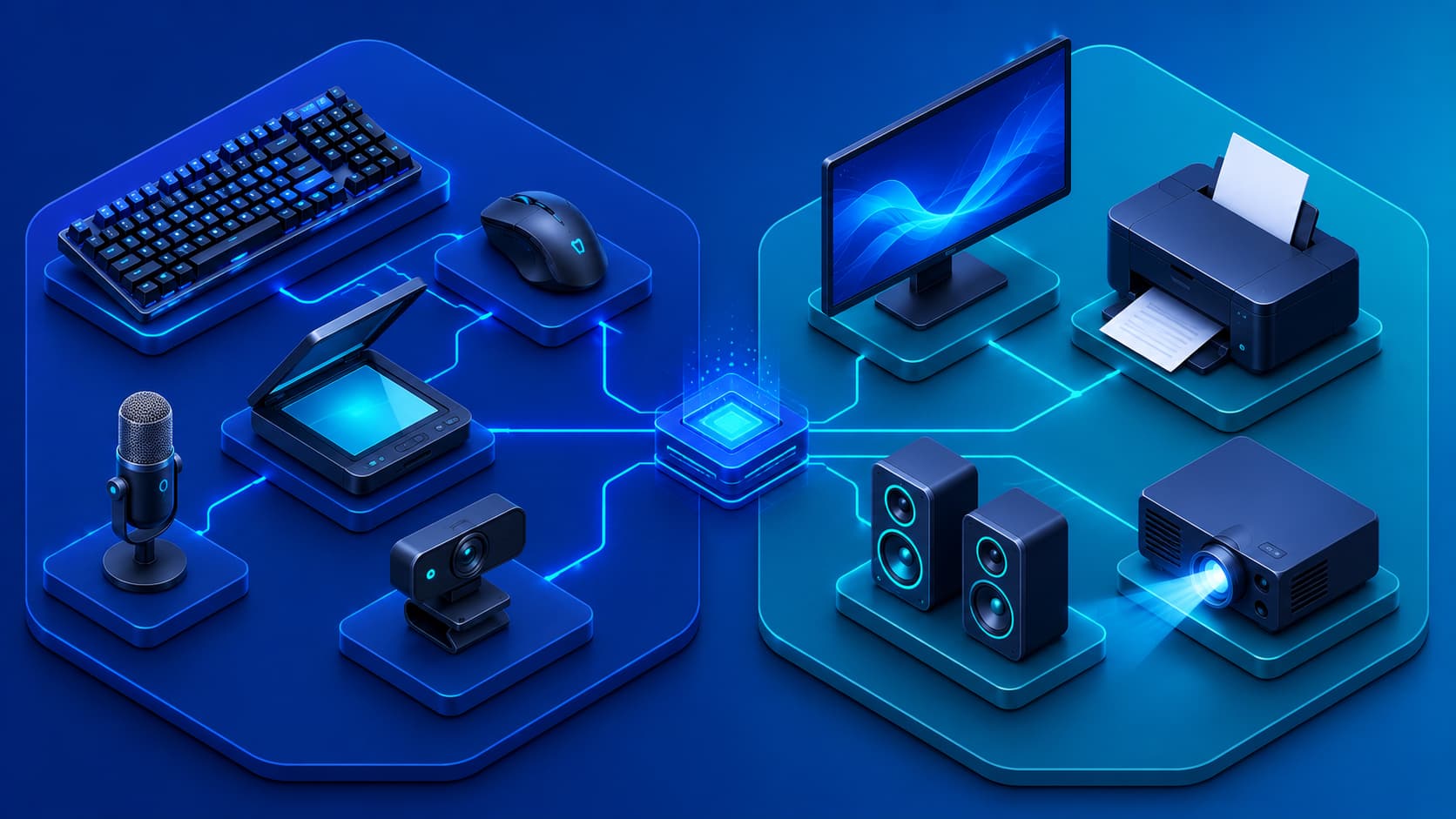
Every interaction with a computer involves the movement of information.
When you type on a keyboard, move a mouse, tap a touchscreen, or speak into a microphone, you're sending information to the computer. When text appears on a monitor, music plays through speakers, or a printer produces a document, the computer is sending information back to you. These two directions of communication form the foundation of how people interact with digital devices.
Hardware responsible for receiving information is known as an input device, while hardware responsible for presenting information is called an output device.
Although they perform different roles, both are essential.
Without input devices, users couldn't communicate with computers. Without output devices, computers couldn't display the results of their work. Together, they create the interactive experience we expect from modern technology.
What Is an Input Device?
An input device is a hardware component that sends information or commands to a computer.
It allows users—or sometimes other systems—to provide data that software can process.
Input devices convert physical actions into digital signals that computers can understand.
For example:
- Pressing a key on a keyboard sends a signal representing a specific character.
- Moving a mouse changes the position of the cursor.
- Speaking into a microphone converts sound waves into digital audio data.
Without input devices, computers would have no practical way to receive instructions from users.
Practical Example
Imagine logging into your email account.
Several input devices may already be working together:
- Your keyboard enters your username and password.
- Your mouse selects buttons and links.
- If available, a fingerprint reader verifies your identity.
- A webcam may authenticate you using facial recognition.
Each device captures different types of information and sends it to the computer for processing.
What Is an Output Device?
An output device presents processed information generated by the computer.
After software performs calculations or processes data, output devices convert that information into forms people can see, hear, or physically use.
Examples include:
- Monitors displaying text, images, and videos.
- Speakers producing sound.
- Printers creating physical documents.
- Projectors displaying presentations on large screens.
Without output devices, users would have no practical way to view or experience the results of computer processing.
Editorial Insight
Many people think only of monitors when discussing output devices, but output extends far beyond visual displays. Audio systems, printers, projectors, and even specialized devices such as Braille displays all exist to communicate information from computers to users in different ways.
Why Both Types Are Important
Input and output devices work together continuously.
Imagine writing a document:
- You type using a keyboard.
- The keyboard sends information to the computer.
- The software processes each keystroke.
- The monitor immediately displays the text you've entered.
Without input devices, the document couldn't be created.
Without output devices, you wouldn't be able to see what you were writing.
Nearly every interaction with a computer follows this same pattern:
Input → Processing → Output.
Why This Matters
Understanding this simple cycle helps explain how computers perform virtually every task.
Whether you're editing a photo, playing a game, attending an online meeting, or browsing the web, information is constantly flowing between input devices, processing hardware, and output devices.
The Flow of Information
A simplified view of computer operation looks like this:
Input Device → Processing Hardware → Memory & Storage → Output Device
For example:
- You move your mouse.
- The processor interprets the movement.
- The operating system updates the cursor position.
- The monitor displays the new cursor location.
Although this process happens almost instantly, multiple hardware components cooperate behind the scenes to provide a smooth and responsive user experience.
Best Practice
When troubleshooting computer problems, think about where the information flow stops.
For example:
- If your keyboard doesn't respond, the issue may involve the input device.
- If you hear sounds but see nothing on the screen, the problem may involve the output device.
- If both input and output stop working, the issue could lie with the computer's processing hardware or operating system.
Understanding the flow of information makes diagnosing hardware problems much easier.
Common Examples of Input Devices
Input devices come in many forms depending on how users interact with a computer. Some are designed for typing, while others capture images, sound, movement, or touch.
Keyboard
The keyboard is one of the most widely used input devices.
It allows users to enter:
- Letters.
- Numbers.
- Symbols.
- Commands.
Although keyboards vary in layout and design, they all serve the same primary purpose: providing text and command input.
Mouse
A mouse controls the on-screen pointer, allowing users to interact with graphical user interfaces.
Typical actions performed with a mouse include:
- Selecting objects.
- Opening applications.
- Dragging and dropping files.
- Navigating websites.
- Using design software.
Modern mice often include additional buttons, scroll wheels, and programmable controls to improve productivity.
Touchscreen
A touchscreen combines display and input capabilities into a single device.
Users interact directly with the screen by:
- Tapping.
- Swiping.
- Pinching.
- Drawing.
Touchscreens have become standard on smartphones and tablets while also appearing in laptops, kiosks, and point-of-sale systems.
Microphone
Microphones capture sound and convert it into digital signals.
They are widely used for:
- Voice calls.
- Online meetings.
- Voice assistants.
- Audio recording.
- Speech recognition.
As voice-controlled technology continues to evolve, microphones have become increasingly important input devices.
Scanner
Scanners convert printed documents or photographs into digital images that can be stored, edited, or shared electronically.
They remain common in:
- Offices.
- Schools.
- Government organizations.
- Document management systems.
Editorial Insight
New input devices continue to emerge as technology advances. Cameras, fingerprint readers, facial recognition sensors, motion controllers, and stylus pens all expand the ways people can interact with computers beyond the traditional keyboard and mouse.
Common Examples of Output Devices
Output devices allow computers to present processed information in forms users can understand.
Monitor
The monitor is the primary visual output device.
It displays:
- Text.
- Images.
- Videos.
- Software interfaces.
- Games.
- Websites.
Modern monitors differ in size, resolution, refresh rate, and display technology, but they all share the same purpose of presenting visual information.
Speakers
Speakers convert digital audio into sound.
They enable users to hear:
- Music.
- Videos.
- Notifications.
- Voice calls.
- System alerts.
Without speakers or headphones, many multimedia experiences would be incomplete.
Printer
Printers produce physical copies of digital documents, photographs, labels, and other materials.
Although many workplaces have adopted paperless workflows, printers remain valuable for:
- Contracts.
- Reports.
- Educational materials.
- Shipping labels.
- Official records.
Projector
Projectors display computer output on much larger surfaces than monitors.
They are commonly used in:
- Classrooms.
- Conference rooms.
- Business presentations.
- Entertainment venues.
Their ability to share information with large audiences makes them an important output device.
Devices That Perform Both Roles
Some hardware devices function as both input and output devices.
Touchscreen Displays
Touchscreens display information while simultaneously detecting user touches.
This dual functionality makes them both an output device and an input device.
Headsets
A headset combines:
- Headphones for audio output.
- A microphone for voice input.
This allows users to communicate during online meetings, gaming sessions, and voice calls using a single device.
Multifunction Printers
Many modern office printers include built-in scanners.
These devices can:
- Print documents (output).
- Scan documents (input).
Combining both capabilities into one machine improves efficiency while saving space.
Input and Output in Everyday Computing
Nearly every computing task involves both input and output working together.
For example:
Typing an Email
- Keyboard → Input
- Processor → Processing
- Monitor → Output
Watching a Movie
- Mouse or touchscreen → Input
- Software → Processing
- Monitor and speakers → Output
Printing a Report
- Keyboard and mouse → Input
- Software → Processing
- Printer → Output
These examples demonstrate that computers continuously alternate between receiving information and presenting results during normal operation.
Practical Example
When participating in a video conference:
- Your webcam and microphone send video and audio to the computer (input).
- The application processes the data.
- Your monitor displays other participants.
- Your speakers play their voices (output).
This constant exchange of information happens in real time, illustrating how multiple input and output devices work together to create a seamless communication experience.
Common Misconceptions
Understanding the differences between input and output devices helps prevent several common misunderstandings about computer hardware.
A Monitor Is Not an Input Device
Many beginners assume that every monitor can both display information and receive user input. In reality, a standard monitor only performs one role—it displays visual information generated by the computer.
Only monitors equipped with touchscreen technology can detect user interaction, allowing them to function as both an input device and an output device.
A Printer Doesn't Send Information to the Computer
A traditional printer only receives information from the computer and produces printed output.
It becomes both an input and output device only when it includes additional scanning functionality, such as in a multifunction printer.
Input Devices Don't Process Data
Input devices are responsible for collecting information and sending it to the computer—they do not process that information themselves.
Data processing occurs inside components such as:
- The processor (CPU).
- Memory (RAM).
- Other internal hardware managed by the operating system.
Editorial Insight
Understanding the responsibilities of each hardware component makes troubleshooting much easier. If a keyboard stops responding, the problem is unlikely to involve data processing. Likewise, if a monitor displays incorrect information, the issue may originate from the graphics hardware or software rather than the monitor itself.
Frequently Asked Questions
What Is the Difference Between Input Devices and Output Devices?
Input devices send information or commands to a computer, while output devices present processed information from the computer back to the user.
A simple way to remember this is:
- Input = Information goes into the computer.
- Output = Information comes out of the computer.
Is a Touchscreen an Input or Output Device?
A touchscreen performs both roles.
It displays visual information like a monitor while simultaneously detecting touch input from the user.
Can One Device Be Both an Input and Output Device?
Yes.
Examples include:
- Touchscreen displays.
- Headsets.
- Multifunction printers with built-in scanners.
These devices combine multiple hardware functions into a single product.
Why Are Input Devices Important?
Without input devices, users would have no practical way to provide commands or data to a computer.
Every task—from opening an application to writing a document—begins with some form of user input.
Why Are Output Devices Important?
Output devices allow computers to communicate results by presenting:
- Text.
- Images.
- Audio.
- Video.
- Printed documents.
Without output devices, users would be unable to see, hear, or otherwise access the results of computer processing.
Conclusion
Input devices and output devices form the foundation of human-computer interaction.
Input devices allow users to communicate with computers by providing commands and data, while output devices present the results of processing through visual, audio, or printed formats. Although they perform opposite roles, they work together continuously to create the seamless digital experiences we rely on every day.
Understanding these two categories of hardware provides an important foundation for learning more advanced computer components and how complete computing systems operate.
Whether you're using a desktop computer, laptop, smartphone, tablet, or another digital device, every interaction depends on a constant exchange of information between input devices, processing hardware, and output devices.
Final Takeaway
Input and output devices may seem like simple hardware components, but they are essential to every computing experience. Every click, keystroke, voice command, and touch begins with an input device, while every image, sound, notification, or printed page reaches you through an output device.
By understanding how these devices work together, you'll gain a stronger foundation for learning computer hardware, operating systems, networking, cybersecurity, and other areas of modern technology.