Software powers nearly every aspect of modern life.
From the mobile apps we use every morning to enterprise systems that manage global businesses, software has become the foundation of today's digital world. Whether you're sending messages, shopping online, streaming movies, managing finances, or controlling smart devices, software works behind the scenes to make these experiences possible.
However, software development is much broader than simply writing code.
Modern software is built using an ecosystem of technologies that includes operating systems, databases, programming languages, application programming interfaces (APIs), development tools, testing frameworks, cloud platforms, deployment pipelines, and security practices.
For newcomers, this ecosystem can feel overwhelming. It's common to encounter unfamiliar terms such as Docker, Git, REST APIs, SQL databases, CI/CD pipelines, IDEs, software architecture, and DevOps without understanding how they relate to one another.
This guide takes a roadmap approach.
Instead of explaining each technology in isolation, it shows how the major components of software development fit together. By understanding the overall ecosystem first, you'll have a clearer picture of what each technology does, why it matters, and where to focus your learning next.
Why a Software Development Roadmap Matters
Learning software development without a roadmap is like trying to build a house without a blueprint.
Many beginners jump directly into programming languages without understanding the tools and systems that professional developers use every day.
A structured roadmap helps you:
- Understand how software is planned, built, tested, deployed, and maintained.
- Learn technologies in a logical order.
- Recognize how different tools work together.
- Avoid spending time on topics that don't match your goals.
- Build practical skills that reflect real-world software development.
Rather than treating software development as a collection of unrelated technologies, a roadmap presents it as a connected ecosystem.
The Modern Software Ecosystem
Software development involves multiple layers that work together throughout the application lifecycle.
A simplified view looks like this:
Software Development
│
├── Operating Systems
├── Programming Languages
├── Development Tools (IDEs)
├── Version Control (Git)
├── Databases
├── APIs
├── Software Architecture
├── Testing
├── Build Tools
├── Package Managers
├── Cloud Platforms
├── CI/CD Pipelines
├── Monitoring
└── Security
Each layer plays a different role.
For example, programming languages are used to write application logic, databases store information, APIs enable communication between systems, and deployment pipelines automate software delivery.
Understanding these relationships makes it much easier to navigate the software development landscape.
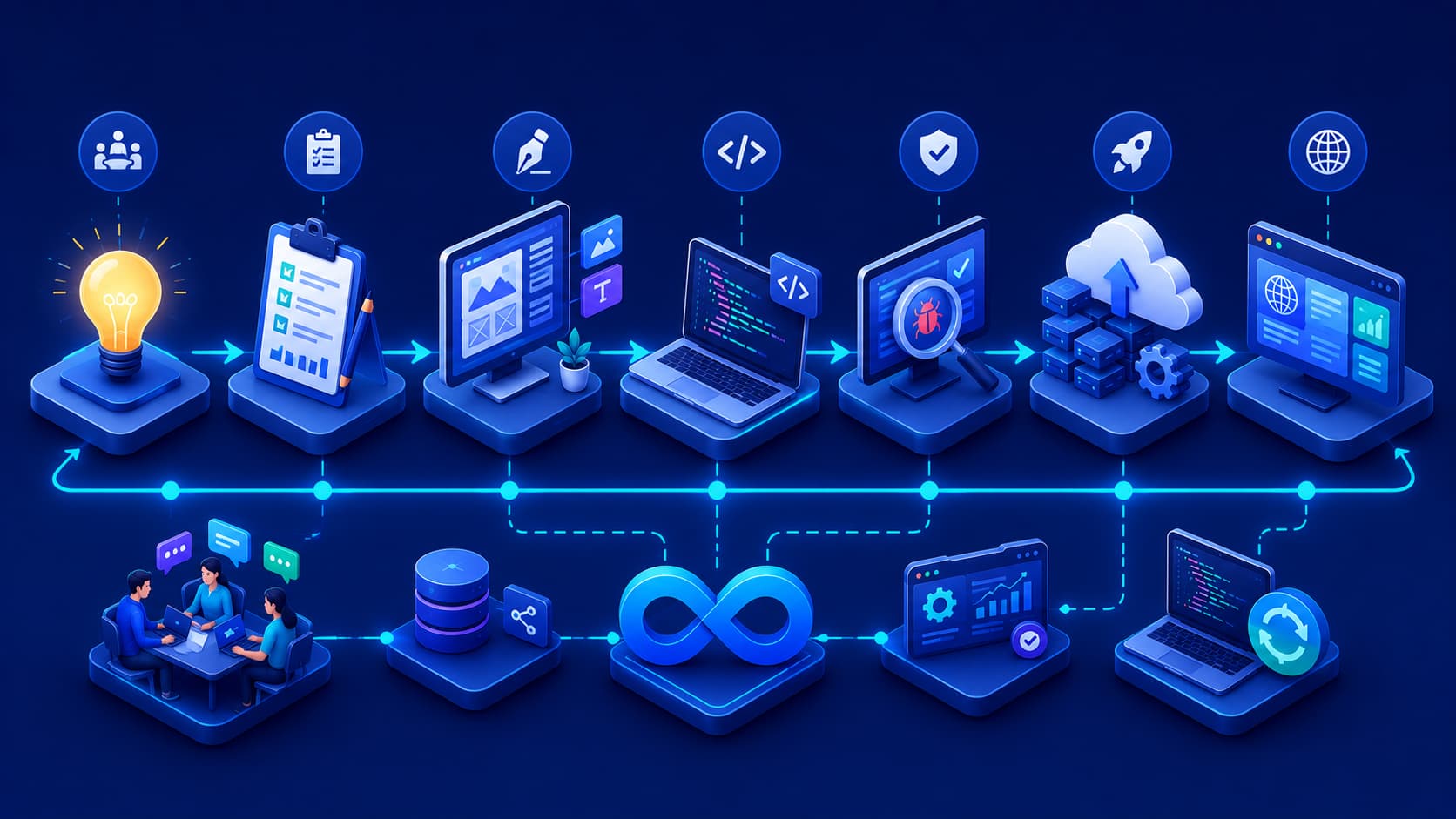
The Software Development Lifecycle
Every successful software project follows a series of stages, often referred to as the Software Development Lifecycle (SDLC).
Although different organizations use different methodologies, most projects include the following phases:
- Requirements gathering
- Planning and design
- Development
- Testing
- Deployment
- Monitoring
- Maintenance
- Continuous improvement
Rather than ending after deployment, modern software development is an ongoing cycle of updates, improvements, security patches, and new feature releases.
Core Components of Modern Software Development
Building modern software requires much more than writing application code. A successful software project combines multiple technologies that work together throughout the development lifecycle.
Understanding the purpose of each component helps developers build applications that are scalable, maintainable, and reliable.
Operating Systems
Every software application runs on an operating system (OS).
The operating system manages hardware resources such as memory, processors, storage devices, and networking while providing the environment in which applications execute.
Common operating systems include:
- Windows
- macOS
- Linux
- Android
- iOS
Although users interact with applications directly, every application ultimately depends on the services provided by its underlying operating system.
Related article: Operating Systems Explained
Programming Languages
Programming languages are the tools developers use to communicate with computers.
Different languages are designed for different purposes.
Some of the most widely used include:
- Python
- JavaScript
- Java
- C#
- PHP
- Go
- Rust
Choosing a programming language depends on the type of software being developed rather than which language is considered "best."
Integrated Development Environments (IDEs)
An Integrated Development Environment (IDE) provides developers with everything they need to write, edit, debug, and test software efficiently.
Popular IDEs include:
- Visual Studio Code
- IntelliJ IDEA
- Visual Studio
- PhpStorm
- PyCharm
Modern IDEs improve productivity through intelligent code completion, debugging tools, integrated terminals, and extension support.
Version Control
Professional software development depends heavily on version control systems.
Version control allows developers to:
- Track code changes
- Collaborate with team members
- Restore previous versions
- Review code history
- Manage multiple development branches
Git has become the industry standard for version control and is used by organizations of all sizes.
Related article: What Is Version Control?
Databases
Most applications need a place to store information.
Databases organize and manage data so that applications can retrieve, update, and analyze information efficiently.
Common database categories include:
- Relational databases
- NoSQL databases
- In-memory databases
- Distributed databases
Applications such as e-commerce websites, banking systems, healthcare platforms, and social media services all depend on databases to function reliably.
APIs
Application Programming Interfaces (APIs) allow different software systems to communicate with one another.
Instead of building every feature internally, applications often integrate external services through APIs.
Examples include:
- Payment gateways
- Weather services
- Authentication providers
- AI platforms
- Mapping services
- Email delivery services
Modern software is increasingly built as interconnected services rather than isolated applications.
Related article: What Is an API?
Software Architecture
As applications become larger, organizing software effectively becomes increasingly important.
Software architecture defines how an application is structured and how its components interact.
Common architectural approaches include:
- Monolithic architecture
- Layered architecture
- Microservices
- Event-driven architecture
- Serverless architecture
Each approach offers different advantages depending on project size, scalability requirements, and operational complexity.
Rather than searching for a universally "best" architecture, development teams choose the one that best aligns with their technical and business goals.
Software Testing
Testing helps ensure software behaves as expected before it reaches users.
A comprehensive testing strategy typically includes several types of testing.
Unit Testing
Verifies individual functions or components independently.
Integration Testing
Confirms that multiple components work correctly together.
System Testing
Evaluates the complete application in an environment similar to production.
User Acceptance Testing
Validates that the software meets business requirements and user expectations.
Automated testing has become an essential practice because it improves software quality while reducing the time required to detect regressions.
Deployment and DevOps
Developing software is only part of the journey.
Applications must also be deployed, monitored, and maintained after release.
Modern development teams commonly use DevOps practices to automate these activities.
Typical deployment workflows include:
- Continuous Integration (CI)
- Continuous Delivery (CD)
- Continuous Deployment
- Infrastructure as Code
- Automated monitoring
- Centralized logging
These practices enable organizations to deliver updates more frequently while maintaining system stability.
How Everything Connects
One of the biggest advantages of understanding the software ecosystem is recognizing how each technology supports the others.
A simplified workflow looks like this:
Requirements
      │
      ▼
Software Design
      │
      ▼
Programming
      │
      ▼
Version Control
      │
      ▼
Testing
      │
      ▼
Build Process
      │
      ▼
Deployment
      │
      ▼
Cloud Infrastructure
      │
      ▼
Monitoring & Maintenance
Although each stage involves different tools and technologies, they all contribute to delivering reliable software to end users.
Understanding this workflow provides a much clearer perspective than studying each technology independently.
Recommended Learning Path for Different Career Goals
One of the most common questions beginners ask is:
"What should I learn first?"
The answer depends on your career goals.
While every software developer benefits from understanding the overall software ecosystem, different specializations require different areas of expertise.
Web Developer
Web developers focus on building websites and web applications.
A typical learning path includes:
- HTML and CSS
- JavaScript
- A backend programming language
- Databases
- REST APIs
- Authentication
- Version Control
- Cloud deployment
As projects become more complex, developers also learn software architecture, automated testing, and application security.
Mobile Application Developer
Mobile developers create applications for smartphones and tablets.
In addition to general programming knowledge, they study:
- Android or iOS development
- Mobile UI design
- Local data storage
- API integration
- Mobile application testing
- Performance optimization
Backend Developer
Backend developers build the systems that power applications behind the scenes.
Their responsibilities typically include:
- Server-side programming
- Database management
- API development
- Authentication
- Caching
- Performance optimization
- Security
Strong backend systems ensure applications remain reliable, scalable, and secure.
DevOps Engineer
DevOps Engineers focus on automating software delivery and infrastructure management.
Their skill set often includes:
- Linux
- Cloud platforms
- Docker
- Kubernetes
- CI/CD pipelines
- Infrastructure as Code
- Monitoring
- Automation
Rather than writing application features, DevOps Engineers help development teams deliver software efficiently and reliably.
Software Architect
Software Architects design the overall structure of complex software systems.
They make decisions about:
- System architecture
- Scalability
- Performance
- Security
- Technology selection
- Integration between services
This role typically requires years of software development experience across multiple domains.
Best Practices for Learning Software Development
The software industry evolves continuously, making lifelong learning an essential part of every developer's career.
The following practices can help you build strong technical foundations.
Learn Concepts Before Tools
Programming languages and frameworks change over time.
Fundamental concepts such as algorithms, software design, networking, databases, and architecture remain valuable regardless of the technologies you use.
A strong understanding of these principles makes it much easier to learn new tools in the future.
Build Real Projects
Reading documentation is important, but practical experience is even more valuable.
Building personal projects helps reinforce theoretical knowledge while exposing you to real-world development challenges.
Examples include:
- Personal portfolios
- Blog platforms
- Task management applications
- REST APIs
- Inventory systems
- E-commerce applications
Each completed project strengthens both your technical skills and your portfolio.
Learn Version Control Early
Many beginners postpone learning Git until they start working professionally.
In reality, version control should be part of every software project from the beginning.
Using Git consistently helps develop collaboration habits that are essential in professional software development.
Practice Debugging
Writing code is only part of software development.
Finding and fixing problems is equally important.
Developers who become comfortable reading logs, identifying errors, and troubleshooting applications generally improve much faster than those who focus only on writing new features.
Never Stop Learning
The software industry changes rapidly.
New frameworks, programming languages, cloud services, AI tools, and development methodologies appear every year.
Developers who continuously improve their skills remain adaptable and better prepared for future opportunities.
Common Challenges in Software Development
Every software project presents technical and organizational challenges.
Some of the most common include:
- Managing increasing application complexity.
- Maintaining software quality as projects grow.
- Protecting applications against security vulnerabilities.
- Scaling applications for larger numbers of users.
- Coordinating collaboration between development teams.
- Keeping documentation up to date.
- Balancing rapid feature delivery with long-term maintainability.
Recognizing these challenges early helps developers make better technical decisions throughout the software development lifecycle.
Frequently Asked Questions
Do I need to learn multiple programming languages?
Not at the beginning.
Mastering one programming language and understanding fundamental software development concepts provides a stronger foundation than learning several languages superficially.
Is software development only about coding?
No.
Professional software development also involves planning, system design, testing, documentation, deployment, monitoring, maintenance, and collaboration.
Coding is only one part of the overall process.
Should I learn databases before APIs?
A basic understanding of databases is generally helpful before learning APIs because many APIs retrieve or update stored data.
However, both topics complement each other and are often learned together during practical projects.
Is cloud computing required for software development?
Not for every project.
However, because many modern applications are deployed in cloud environments, understanding basic cloud concepts has become increasingly valuable for software developers.
How long does it take to become a software developer?
The timeline varies depending on your goals, prior experience, and learning pace.
Consistent practice through real-world projects is often more important than the amount of time spent studying theory alone.
Conclusion
Modern software development is an interconnected ecosystem rather than a single discipline.
From operating systems and programming languages to databases, APIs, software architecture, testing, cloud platforms, and DevOps, each component contributes to building reliable, scalable, and maintainable applications.
Understanding how these technologies fit together provides a much stronger foundation than learning individual tools in isolation.
Instead of trying to master everything at once, follow a structured roadmap that builds your knowledge step by step. As your experience grows, you'll naturally develop the ability to choose the right technologies, design better systems, and adapt to the continuous evolution of the software industry.
Final Takeaway
Think of software development as a complete lifecycle rather than simply writing code. By understanding the relationships between planning, development, testing, deployment, and maintenance, you'll gain the perspective needed to build high-quality software and continue growing as a developer throughout your career.