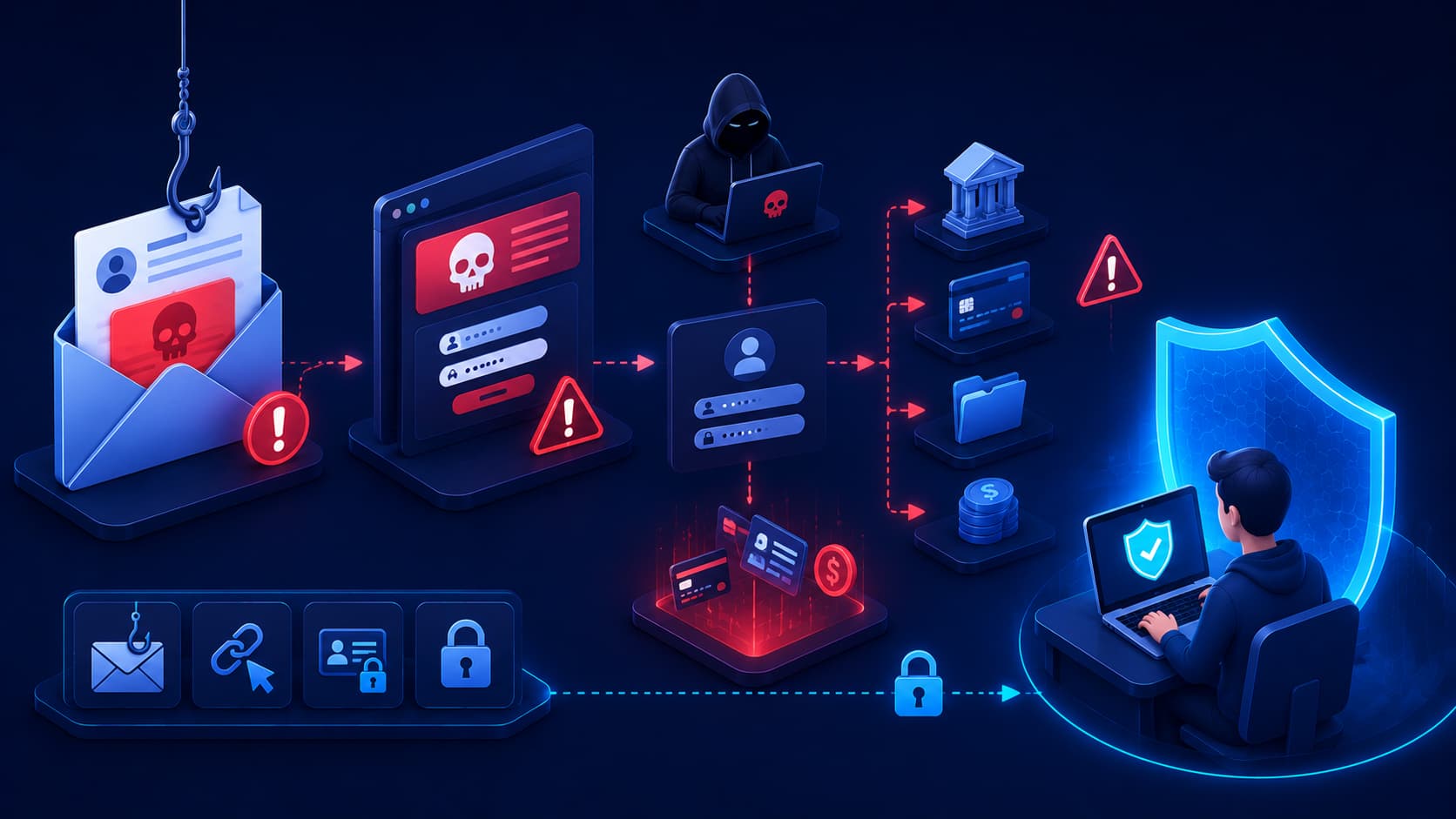
Imagine opening your inbox and finding an email that appears to come from your bank.
The message looks professional.
It uses the correct logo, familiar colors, and even includes your name. According to the email, there has been suspicious activity on your account, and you're asked to verify your identity immediately.
Without thinking twice, you click the link, enter your username and password, and continue with your day.
Only later do you discover that the email wasn't sent by your bank at all—it was created by a cybercriminal.
This type of attack is known as phishing, and it remains one of the most successful forms of cybercrime because it targets human trust rather than technical weaknesses.
Instead of breaking through sophisticated security systems, attackers simply convince people to voluntarily hand over the information they want.
Fortunately, phishing attacks often leave warning signs behind.
Once you know what to look for, they become much easier to recognize and avoid.
What Is Phishing?
Phishing is a type of cyberattack in which attackers impersonate trusted individuals or organizations to trick people into revealing sensitive information.
Their objective may be to steal:
- Usernames.
- Passwords.
- Banking details.
- Credit card numbers.
- Verification codes.
- Other confidential information.
Although phishing attacks are most commonly delivered through email, they can also appear through:
- Text messages.
- Phone calls.
- Social media platforms.
- Messaging applications.
- Online advertisements.
While delivery methods continue to evolve, the underlying strategy remains the same.
Attackers create a believable story that encourages victims to act before they have time to question whether the message is genuine.
Why Phishing Is Different From Other Cyberattacks
Many cyberattacks attempt to exploit software vulnerabilities.
Phishing, however, exploits human decision-making.
Instead of attacking a computer directly, attackers manipulate emotions such as:
- Fear.
- Urgency.
- Curiosity.
- Trust.
Because people naturally respond to these emotions, phishing continues to be one of the most effective attack techniques used by cybercriminals.
Editorial Insight
One reason phishing remains so successful is that it doesn't require attackers to bypass advanced security systems. Convincing a single user to voluntarily reveal their credentials is often much easier than attempting to compromise a well-protected network.
Why Is Phishing So Effective?
Unlike many cyberattacks that rely on technical vulnerabilities, phishing targets human psychology.
Attackers understand that people often react emotionally when they believe something requires immediate attention.
Common phishing messages may claim that:
- Your bank account has been locked.
- A package couldn't be delivered.
- Your work account will expire within hours.
These scenarios are carefully designed to create anxiety.
When people feel rushed, they're much less likely to:
- Inspect links carefully.
- Verify the sender.
- Question whether the message is legitimate.
Phishing attacks also take advantage of familiarity.
Cybercriminals frequently imitate well-known companies because people naturally trust brands they recognize. A professionally designed fake email can sometimes look almost identical to a genuine one.
Real-World Example
Imagine receiving a message from what appears to be a popular online shopping company stating that your recent order cannot be delivered unless you update your payment information.
The email includes official branding, realistic formatting, and a convincing explanation.
If you click the provided link instead of visiting the retailer's official website directly, you may unknowingly submit your payment information to attackers.
Understanding these psychological tactics makes phishing attempts much easier to recognize.
Common Types of Phishing Attacks
Although phishing campaigns vary, they generally fall into several common categories.
Email Phishing
Email phishing is the most familiar form of phishing.
Attackers send fraudulent emails pretending to represent:
- Banks.
- Online retailers.
- Cloud service providers.
- Delivery companies.
- Government agencies.
These messages typically contain a malicious link or attachment designed to steal sensitive information.
SMS Phishing (Smishing)
Instead of email, attackers send fraudulent text messages.
Common messages claim:
- A package is waiting for delivery.
- A payment has failed.
- Immediate action is required.
Their goal is to persuade recipients to visit fake websites or disclose personal information.
Voice Phishing (Vishing)
Some attackers use phone calls rather than written messages.
They may pretend to represent:
- A bank.
- Technical support.
- A government organization.
Their objective is to persuade victims to share confidential information over the phone.
Spear Phishing
Unlike mass phishing campaigns, spear phishing targets specific individuals or organizations.
Attackers often research their victims beforehand, making these messages significantly more personal and convincing.
Because they are carefully crafted using information about the intended target, spear phishing attacks are often much more difficult to identify than generic phishing emails.
How to Spot a Phishing Attempt
Not every suspicious message is a phishing attack.
However, many phishing attempts share common warning signs. Learning to recognize these indicators can significantly reduce your chances of becoming a victim.
Unexpected Requests
Be cautious whenever you receive an unexpected email, text message, or phone call asking you to verify personal information or log in to an account.
Even if the message appears to come from a trusted company, take a moment to verify its authenticity through official channels.
For example, instead of clicking the provided link:
- Visit the company's official website manually.
- Use the organization's official mobile app.
- Contact customer support using a verified phone number.
Taking these extra steps can prevent attackers from obtaining sensitive information.
A Sense of Urgency
Phishing messages frequently pressure recipients to act immediately.
Common examples include:
- "Your account will be suspended today."
- "Immediate verification required."
- "Payment failed. Update your details now."
The purpose of these messages is to make you react emotionally before you have time to think critically.
Legitimate organizations rarely threaten customers into taking immediate action through alarming emails or text messages.
Suspicious Links
Before clicking any link, inspect it carefully.
On a computer, hovering your mouse over a hyperlink usually reveals its destination.
On mobile devices, pressing and holding a link often displays the full web address.
If the destination doesn't match the organization's official domain, it's safer not to click it.
When you're unsure, visit the organization's website manually rather than using the link included in the message.
Requests for Sensitive Information
Banks, government agencies, and reputable companies generally do not ask customers to provide:
- Passwords.
- One-time verification codes.
- Complete payment details.
through email or text messages.
Any unexpected request for this type of information should immediately raise suspicion.
Editorial Insight
Many phishing attacks succeed not because the fake website looks perfect, but because victims act too quickly. Taking just a few moments to verify a request often prevents an attack before it even begins.
What Happens After Someone Falls for a Phishing Attack?
The consequences depend on the attacker's objective.
Sometimes attackers simply want to steal login credentials.
In other cases, they may:
- Install malware.
- Access financial accounts.
- Use stolen information to launch additional attacks.
For individuals, phishing may lead to:
- Identity theft.
- Financial losses.
- Compromised online accounts.
For businesses, a single successful phishing attack may:
- Expose confidential information.
- Disrupt daily operations.
- Provide attackers with access to internal systems.
Although phishing is relatively simple in concept, it remains one of the most serious cybersecurity risks because of the potentially severe consequences.
How to Protect Yourself From Phishing
Fortunately, protecting yourself from phishing does not require advanced technical expertise.
A few consistent habits can significantly reduce your risk.
Think Before You Click
If a message seems unusual, pause before opening attachments or clicking links.
Ask yourself:
- Was I expecting this message?
- Does this request seem reasonable?
- Is the sender who they claim to be?
A few extra seconds of caution can prevent much larger problems later.
Verify the Sender
Don't rely solely on the sender's display name.
Check the actual email address carefully.
Attackers often create addresses that closely resemble legitimate domains while introducing subtle spelling differences.
Enable Multi-Factor Authentication
Even if an attacker steals your password, multi-factor authentication (MFA) makes unauthorized access much more difficult.
Because MFA requires an additional verification step, it remains one of the most effective defenses against credential theft.
Keep Software Updated
Web browsers, operating systems, and email applications regularly receive security updates that protect against newly discovered threats.
Keeping software updated reduces the likelihood that attackers can exploit known vulnerabilities.
Report Suspicious Messages
If you receive a phishing email at work, report it to your IT or security team instead of simply deleting it.
For personal email accounts, many providers include built-in options for reporting phishing attempts.
Reporting suspicious messages helps improve spam detection and may protect other users from becoming victims.
Best Practice
Create a habit of independently verifying unexpected requests involving money, passwords, or personal information. Opening your browser and navigating directly to the company's official website is almost always safer than clicking a link provided in an email or text message.
Why Phishing Continues to Succeed
Given today's widespread cybersecurity awareness, it's reasonable to wonder why phishing remains so common.
The answer is simple:
Attackers constantly adapt.
As people become better at recognizing traditional phishing emails, cybercriminals develop increasingly convincing techniques.
Modern phishing campaigns may:
- Use personalized information gathered from social media.
- Imitate ongoing conversations.
- Pretend to be trusted business contacts.
- Use artificial intelligence to generate more realistic messages with fewer spelling and grammar mistakes.
This constant evolution means cybersecurity awareness must continue evolving as well.
Frequently Asked Questions
What Is Phishing?
Phishing is a cyberattack that tricks people into revealing sensitive information by pretending to be a trusted individual or organization.
Rather than exploiting software vulnerabilities, phishing attacks manipulate human trust, encouraging victims to voluntarily disclose confidential information such as passwords, verification codes, or financial details.
Is Phishing Always Sent by Email?
No.
Although email phishing is the most common form, phishing attacks can also occur through:
- Text messages (SMS).
- Phone calls.
- Social media platforms.
- Messaging applications.
- Fake websites.
Because attackers continuously adopt new communication channels, it's important to remain cautious regardless of how an unexpected message is delivered.
What Should I Do If I Click a Phishing Link?
The appropriate response depends on what happened after clicking the link.
If you clicked the link but did not enter any information:
- Close the page immediately.
- Avoid downloading any files.
- Monitor your device for unusual behavior.
If you entered login credentials or financial information:
- Change your passwords immediately.
- Enable multi-factor authentication (MFA).
- Contact the affected service provider or financial institution if necessary.
Responding quickly can significantly reduce the potential impact of a phishing attack.
Can Antivirus Software Stop Phishing?
Antivirus software can block some malicious websites and downloads, but it cannot prevent every phishing attack.
Effective protection also depends on:
- User awareness.
- Careful decision-making.
- Safe browsing habits.
- Verifying suspicious requests.
Technology provides valuable assistance, but informed users remain one of the strongest defenses against phishing.
Why Do Phishing Attacks Target Ordinary People?
Cybercriminals don't target only large organizations.
Personal accounts often contain valuable information such as:
- Financial details.
- Identity documents.
- Email accounts.
- Other sensitive personal data that can be exploited or sold.
Every internet user is therefore a potential target, regardless of technical knowledge or professional background.
Editorial Insight
Attackers don't necessarily look for the most technically skilled victims—they often look for the easiest opportunity. A moment of careful verification can stop an attack that sophisticated security software might never encounter because the user avoided engaging with it in the first place.
Conclusion
Phishing remains one of the most effective cyber threats because it targets human behavior instead of technical vulnerabilities.
Rather than breaking into secure systems, attackers rely on:
- Trust.
- Urgency.
- Deception.
to persuade people to voluntarily reveal sensitive information.
Fortunately, phishing attacks often leave recognizable warning signs.
By slowing down, verifying unexpected requests, checking links carefully, and enabling multi-factor authentication, you can dramatically reduce your chances of becoming a victim.
Cybersecurity isn't always about sophisticated technology.
Sometimes the most effective defense is simply taking a moment to question whether a message is truly what it claims to be.
Final Takeaway
Phishing succeeds because it exploits human psychology rather than software vulnerabilities.
Learning to recognize common warning signs—such as unexpected requests, urgent messages, suspicious links, and attempts to collect sensitive information—can dramatically reduce your exposure to one of today's most widespread cyber threats.
By combining healthy skepticism with practical security habits like verifying senders, using multi-factor authentication, keeping software updated, and reporting suspicious messages, you'll be far better prepared to protect your accounts, personal information, and digital identity in an increasingly connected world.