Computer networks rely on many different devices to keep information moving efficiently, and one of the most important is the network switch. Although switches often receive less attention than routers, they play a critical role in connecting devices within a Local Area Network (LAN). Without switches, offices, schools, data centers, and even many home networks would struggle to support multiple computers and connected devices efficiently.
Understanding how a network switch works helps explain why communication inside local networks is both fast and reliable. While routers connect different networks together, switches focus on enabling efficient communication between devices on the same network.
What Is a Network Switch?
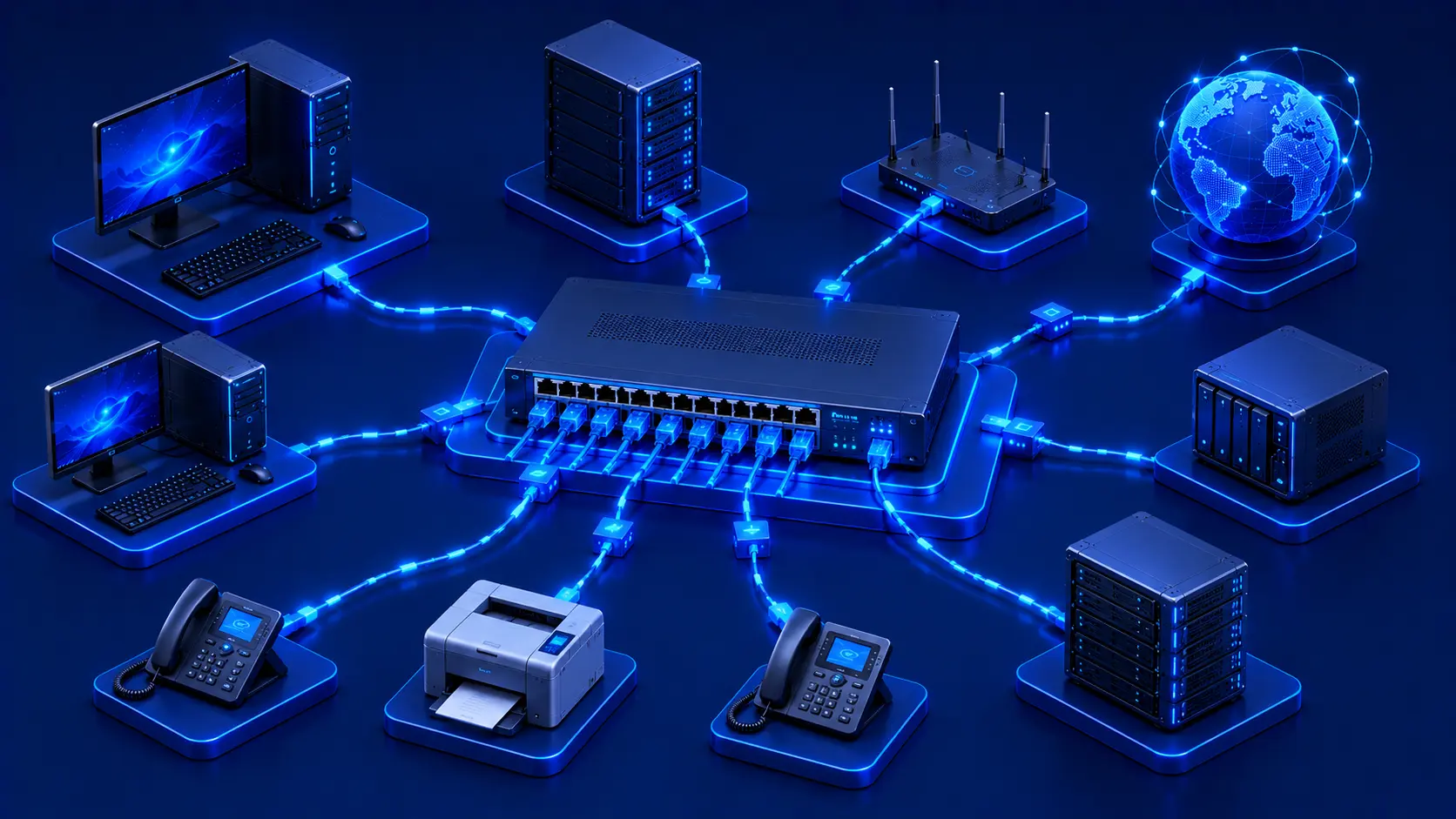
A network switch is a networking device that connects multiple devices within the same Local Area Network (LAN). Unlike a router, which connects separate networks, a switch is designed to manage communication between devices that already belong to the same network.
Common devices connected to a network switch include:
- Desktop computers.
- Laptops.
- Network printers.
- Servers.
- Network Attached Storage (NAS).
- IP phones.
- Security cameras.
- Wireless access points.
By connecting these devices together, a switch allows them to exchange information quickly and efficiently without creating unnecessary network traffic.
Practical Example
Imagine a small office with:
- 15 desktop computers.
- A shared printer.
- A file server.
- Several IP phones.
Rather than connecting each device directly to every other device, they all connect to a single network switch. When one employee accesses a file or prints a document, the switch delivers the data directly to the appropriate destination, allowing everyone to share resources efficiently.
Editorial Insight
A switch is essentially the traffic coordinator inside a local network. Instead of broadcasting every piece of information to every connected device, it intelligently forwards data only where it needs to go. This targeted communication is one of the main reasons modern LANs are fast and efficient.
Why Is a Network Switch Important?
As more devices are added to a network, efficient communication becomes increasingly important. A network switch helps organize local network traffic by forwarding data only to the intended destination device rather than sending it to every connected device.
This intelligent behavior improves:
- Network efficiency.
- Communication speed.
- Overall performance.
- Scalability.
- Device connectivity.
Because of these advantages, switches have become standard equipment in nearly every business network. Whether an organization has ten computers or thousands, switches help ensure smooth communication between connected devices.
Best Practice
As your local network grows, using a dedicated switch instead of relying solely on a router's built-in Ethernet ports provides greater flexibility and makes future network expansion much easier.
How Does a Switch Work?
Whenever one device sends information to another device on the same network, the data first reaches the switch. The switch determines which connected device should receive the information and forwards the data only to that destination.
Unlike older networking devices that broadcast information to every connected device, modern switches use intelligent forwarding to reduce unnecessary network traffic. This improves communication efficiency while helping devices exchange data more quickly and reliably.
Practical Example
Suppose Computer A sends a file to a network printer.
Instead of transmitting that data to every device connected to the network, the switch identifies the printer as the intended destination and sends the data only to that printer. Other devices continue operating normally without processing unnecessary network traffic.
Switches in Everyday Networks
Although many people never notice them, switches are used in a wide variety of environments, including:
- Office computer networks.
- School computer labs.
- University campuses.
- Hospitals.
- Retail stores.
- Manufacturing facilities.
- Enterprise data centers.
Even many home routers contain a small built-in Ethernet switch that provides multiple LAN ports for wired devices. This allows users to connect desktop computers, gaming consoles, or network storage devices without requiring a separate switch in smaller home environments.
Types of Network Switches
Network switches are available in several types, each designed to meet different networking requirements. The right choice depends on factors such as network size, management needs, budget, and the level of control required.
Unmanaged Switches
An unmanaged switch begins working as soon as it is connected. It requires no configuration or specialized networking knowledge, making it an excellent choice for:
- Home networks.
- Small offices.
- Basic network expansion.
Because of their simplicity, unmanaged switches are typically the most affordable option. They are ideal when users simply need additional Ethernet ports to connect more devices without configuring advanced network features.
Practical Example
Suppose a small office has only four Ethernet ports available on its router but needs to connect:
- Eight desktop computers.
- One network printer.
- One NAS device.
By connecting an unmanaged switch to the router, the office can instantly expand the number of available network ports without changing any network settings.
Managed Switches
A managed switch offers advanced configuration and monitoring capabilities. These switches are commonly used in business and enterprise environments where network administrators require greater visibility and control over network traffic.
Typical managed switch features include:
- Traffic monitoring.
- Virtual LAN (VLAN) support.
- Port management.
- Security settings.
- Performance optimization.
These capabilities make managed switches well suited for larger and more complex networks where performance, security, and reliability are critical.
Smart Switches
A smart switch provides a balance between unmanaged and fully managed switches. It offers basic management features while remaining easier to configure than enterprise-grade managed switches.
Smart switches are often chosen by growing businesses that need more flexibility than an unmanaged switch can provide but do not require the full complexity of enterprise networking equipment.
Editorial Insight
You can think of the three switch types as different levels of control:
- Unmanaged Switch: Plug in and use immediately.
- Smart Switch: Basic configuration with simplified management.
- Managed Switch: Full administrative control for professional environments.
Choosing the right type depends on the size and complexity of your network rather than simply selecting the most expensive option.
How a Switch Improves Network Performance
One of the biggest advantages of a network switch is its ability to reduce unnecessary network traffic. Instead of sending every data packet to every connected device, a switch intelligently forwards data only to its intended destination.
This approach provides several important benefits:
- Faster communication.
- Reduced network congestion.
- Better bandwidth utilization.
- Improved overall network efficiency.
- Higher scalability as more devices are added.
Because of these advantages, switches have become a standard component of modern Local Area Networks, particularly in environments where many devices communicate simultaneously.
Best Practice
For networks with many wired devices, connecting them through a switch instead of relying on a single router improves organization and helps maintain consistent local network performance as the network grows.
Switch vs. Router
Although switches and routers often work together, they serve different purposes within a network. Understanding their distinct roles makes it easier to see how modern networks are structured.
| Feature | Network Switch | Router |
|---|---|---|
| Primary Purpose | Connect devices within one LAN | Connect different networks |
| Works With | Local devices | Local networks and the internet |
| Primary Use | Internal communication | External communication |
| Common Location | Offices, schools, data centers | Homes, businesses, internet gateways |
In a typical office network:
- The switch connects computers, printers, servers, and other local devices.
- The router connects the local network to the internet or other external networks.
Rather than replacing one another, routers and switches complement each other. The switch manages communication within the local network, while the router handles communication beyond it.
Practical Example
Consider a company office:
- Employees' computers connect to a network switch.
- The switch links those devices together for local communication.
- The switch connects to a router.
- The router provides internet access for everyone in the office.
Without the switch, local communication would be less efficient. Without the router, the office would have no connection to external networks.
Real-World Examples
Network switches are used in countless environments where multiple devices need to communicate quickly and reliably. From small offices to massive enterprise data centers, switches form the backbone of most Local Area Networks.
Small Office
A small office with twenty desktop computers uses a network switch so employees can:
- Share network printers.
- Access centralized file servers.
- Communicate efficiently with one another.
Because all devices communicate through the switch, local network traffic remains organized and efficient even when multiple employees are working simultaneously.
School Computer Lab
Schools often connect dozens of classroom computers through network switches, allowing students and teachers to access shared resources such as file servers, learning platforms, and network printers. This centralized connectivity simplifies classroom management while improving resource sharing.
Data Center
Modern data centers rely on hundreds or even thousands of high-performance switches to connect servers, storage systems, and other networking equipment. These switches are designed to deliver extremely low latency and support enormous volumes of internal network traffic.
Editorial Insight
Although switches are rarely visible to end users, they are among the busiest devices in a network. Every time two devices communicate within the same LAN, a switch is typically responsible for ensuring that the data reaches the correct destination efficiently.
Common Misconceptions About Network Switches
A Switch Is Not the Same as a Router
Many people assume that switches and routers perform the same function, but they have different responsibilities. A switch connects devices within a local network, while a router connects different networks together, such as a home or office network and the internet.
A Switch Doesn't Automatically Provide Internet Access
Connecting a computer directly to a switch does not automatically provide internet connectivity. The switch must itself be connected to a router or another network that provides internet access. Without that connection, the switch can only facilitate communication between devices on the local network.
More Ports Don't Always Mean Better Performance
Having more Ethernet ports simply allows more devices to connect. Overall network performance also depends on factors such as:
- Switch hardware.
- Network design.
- Cable quality.
- The performance of connected devices.
Best Practice
Choose a switch based on your network's requirements rather than the number of available ports alone. For growing networks, consider future expansion, management features, and overall hardware quality.
Frequently Asked Questions
What Is a Network Switch in Simple Terms?
A network switch is a device that connects multiple devices within the same local network and allows them to communicate efficiently.
What Is the Difference Between a Switch and a Hub?
Unlike older network hubs, switches intelligently forward data only to the intended destination device. This targeted communication makes network traffic faster and more efficient while reducing unnecessary congestion.
Do Home Networks Need a Switch?
Many homes do not require a separate switch because most routers already include several built-in Ethernet ports. However, adding a dedicated switch becomes useful when additional wired connections are needed.
Can a Switch Improve Network Speed?
A switch cannot increase your internet connection speed, but it can improve the efficiency of communication between devices on your local network by reducing unnecessary traffic.
Can Multiple Switches Be Connected Together?
Yes.
Large organizations commonly connect multiple switches to expand their networks and support hundreds or even thousands of connected devices across different locations.
Conclusion
Network switches are fundamental components of modern Local Area Networks. By connecting devices within the same network and intelligently forwarding data only to its intended destination, switches improve efficiency, reduce unnecessary traffic, and support reliable communication.
Whether you're setting up a small home office, managing a business network, or operating a large data center, switches help ensure devices communicate quickly and effectively. Understanding how switches work also makes it easier to see how routers, switches, and other networking devices work together to build the reliable networks we depend on every day.
Final Takeaway
Keep these key concepts in mind when learning about network switches:
- A switch connects multiple devices within the same Local Area Network (LAN).
- It forwards data only to the intended destination, improving efficiency and reducing unnecessary traffic.
- Unmanaged, smart, and managed switches are designed for different networking requirements.
- Switches improve local communication but do not replace routers.
- A switch alone does not provide internet access—it must connect to a router or another network with internet connectivity.
- Modern businesses, schools, and data centers rely heavily on switches to maintain fast and reliable internal communication.
Understanding how switches operate provides a solid foundation for more advanced networking topics, including VLANs, network segmentation, redundancy, and enterprise network design.