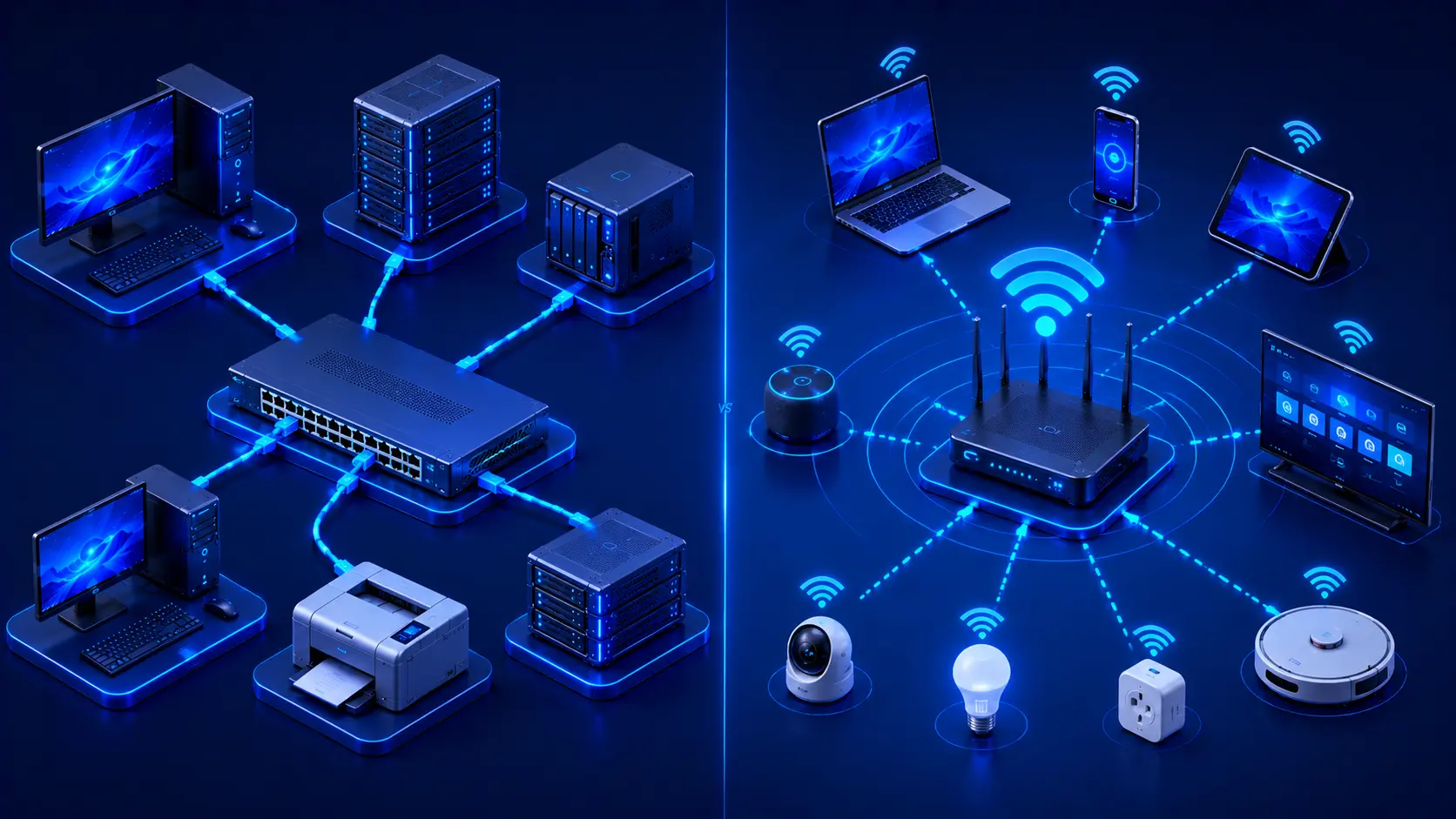
Modern computer networks connect billions of devices around the world every day. Whether you're browsing the web, attending online meetings, streaming videos, or transferring files between computers, your device is likely connected through either a wired or wireless network. Although both technologies share the same goal—allowing devices to communicate and access shared resources—they differ significantly in how they transmit data, their performance, installation requirements, and ideal use cases.
Understanding the strengths and limitations of each networking method helps you choose the most appropriate solution for your home, office, or business. In many cases, the best network combines both technologies to achieve an optimal balance between performance and convenience.
What Is a Wired Network?
A wired network connects devices using physical network cables, most commonly Ethernet cables. These cables create a direct connection between devices and networking equipment such as switches and routers.
Devices commonly connected through wired networks include:
- Desktop computers.
- File servers.
- Network Attached Storage (NAS).
- Network printers.
- Gaming consoles.
- Security cameras.
- VoIP phones.
Because data travels through dedicated physical cables rather than radio waves, wired connections generally provide stable, predictable, and highly reliable performance.
Practical Example
Imagine a small office where employees regularly transfer large files between computers and access a shared file server.
Using Ethernet connections provides several advantages:
- Consistent high-speed file transfers.
- Stable video conferences.
- Reliable access to shared storage.
- Minimal interruptions caused by wireless interference.
For workloads that depend on speed and reliability, wired networking remains the preferred choice.
Editorial Insight
Although wireless networking has become increasingly popular, Ethernet remains the standard for environments where stability is more important than mobility. Data centers, enterprise offices, and professional workstations continue to rely heavily on wired connections because they deliver consistent performance under demanding conditions.
Advantages of Wired Networks
Wired networking offers several important benefits that make it ideal for performance-critical environments. These advantages include:
- High-speed data transfer.
- Low latency.
- Stable communication.
- Minimal signal interference.
- Excellent reliability.
- Better performance for bandwidth-intensive applications.
Because of these characteristics, organizations where network reliability is essential often choose wired connections for servers, desktop workstations, storage systems, and other critical infrastructure.
Best Practice
Whenever possible, connect devices that require maximum performance—such as gaming PCs, desktop workstations, NAS devices, and servers—using Ethernet. Reserve wireless connectivity for mobile devices that benefit more from flexibility than from absolute performance.
What Is a Wireless Network?
A wireless network allows devices to communicate using radio waves instead of physical cables. The most common wireless networking technology is Wi-Fi, which enables devices to connect conveniently without requiring Ethernet cables.
Wireless networks are commonly found in:
- Homes.
- Offices.
- Schools.
- Airports.
- Hotels.
- Coffee shops.
- Public spaces.
Today, most smartphones, tablets, and modern laptops rely primarily on wireless connectivity because it allows users to remain connected while moving freely throughout a building.
Advantages of Wireless Networks
Wireless networking provides a level of flexibility that traditional wired networking cannot easily match. Some of its biggest advantages include:
- Easy installation.
- Greater mobility.
- Convenient device connectivity.
- Reduced cable clutter.
- Flexible workspace layouts.
- Simple expansion for additional devices.
Because users can stay connected while moving between rooms or workspaces, wireless networking has become an essential part of modern homes and businesses. It supports today's mobile-first computing environment while simplifying network deployment in locations where installing cables would be difficult or impractical.
Practical Example
A family using laptops, smartphones, tablets, and smart home devices can move freely throughout the house while remaining connected to the same Wi-Fi network. This mobility is one of the primary reasons wireless networking has become so widely adopted.
Disadvantages of Wired Networks
Although wired networks offer outstanding performance, they also have several limitations that should be considered when designing or expanding a network. These include:
- Physical cable installation.
- Less flexibility for moving devices.
- More complicated deployment in large buildings.
- Cable management requirements.
- Higher installation costs in some environments.
Because every device requires a physical Ethernet connection, adding or relocating equipment often involves installing additional cables. In environments where devices frequently change locations, this can reduce flexibility and increase maintenance costs.
Practical Example
Imagine rearranging an office workspace.
With a wired network, moving several desktop computers may require:
- Running new Ethernet cables.
- Relocating network ports.
- Organizing cable routes.
- Testing each new connection.
These additional steps make large layout changes more time-consuming than in a wireless environment.
Disadvantages of Wireless Networks
Wireless networking provides exceptional convenience, but it also introduces challenges that can affect performance and reliability. Common disadvantages include:
- Signal interference from walls and electronic devices.
- Reduced performance over long distances.
- Higher latency compared to wired connections.
- Potential wireless congestion in crowded areas.
- Greater emphasis on network security.
The quality of a wireless connection depends on several factors, including router placement, building layout, signal interference, and the number of connected devices. As more devices compete for wireless bandwidth, network performance may decrease.
Editorial Insight
Wireless technology continues to improve with every new Wi-Fi generation. However, because radio signals are affected by environmental conditions, wireless connections are generally less predictable than dedicated Ethernet cables, especially in crowded or obstructed environments.
Wired vs. Wireless Comparison
Both networking methods have unique strengths and weaknesses. Rather than viewing them as competing technologies, it's more accurate to see them as complementary solutions that serve different needs.
| Feature | Wired Network | Wireless Network |
|---|---|---|
| Connection Medium | Ethernet cable | Radio waves (Wi-Fi) |
| Mobility | Low | High |
| Installation | Requires cabling | Easier installation |
| Speed | Usually faster and more consistent | Varies depending on signal quality |
| Latency | Lower | Generally higher |
| Reliability | Very stable | Depends on signal conditions |
| Flexibility | Limited by cable length | Excellent mobility |
Instead of replacing one another, modern networks often combine wired and wireless connections to maximize both performance and convenience.
Best Practice
For the best overall experience:
- Use Ethernet for desktop computers, servers, NAS devices, and gaming systems.
- Use Wi-Fi for laptops, smartphones, tablets, and other portable devices.
This hybrid approach provides reliable performance while preserving the flexibility users expect from modern networks.
Which Network Is Better?
There isn't a single answer that fits every situation. The better choice depends entirely on how the network will be used.
Choose a Wired Network If You Need:
- Maximum reliability.
- Low latency.
- Fast file transfers.
- Stable online gaming.
- Professional workstations.
- Servers and storage systems.
Wired networking is especially valuable in environments where uninterrupted connectivity and consistent performance are essential.
Choose a Wireless Network If You Need:
- Mobility.
- Easy installation.
- Flexible workspace layouts.
- Smartphone and tablet connectivity.
- Smart home devices.
- Temporary or expandable networks.
Wireless networking is ideal when users need the freedom to move while staying connected or when installing Ethernet cables is impractical.
Practical Example
A modern home office often combines both technologies:
- A desktop computer uses Ethernet for reliable video meetings and large file transfers.
- Laptops and smartphones connect through Wi-Fi for convenience.
- Smart home devices remain connected wirelessly throughout the house.
This combination delivers both high performance and excellent flexibility, making it the preferred networking approach for many homes and businesses.
Real-World Examples
Home Office
A home office often benefits from using both wired and wireless networking. For example, a desktop computer may be connected using an Ethernet cable to ensure stable video meetings and fast file transfers, while laptops and smartphones use Wi-Fi for greater mobility and convenience.
Gaming Setup
Many gamers connect desktop PCs and gaming consoles using Ethernet rather than Wi-Fi. Wired connections typically provide lower latency and more stable communication, helping reduce lag during online gameplay and improving the overall gaming experience.
Corporate Office
In many business environments, servers, storage devices, and desktop workstations use wired networking to maximize reliability and performance. At the same time, employees connect laptops, tablets, and smartphones through secure Wi-Fi, allowing them to move freely throughout the office while remaining connected.
Editorial Insight
These examples illustrate an important principle of modern networking: the most effective networks rarely rely on a single technology. Instead, organizations combine wired and wireless connectivity so each device uses the connection method best suited to its role.
Common Misconceptions
Wireless Networks Have Replaced Wired Networks
Wireless networking has become extremely popular, but it has not replaced wired networking. Ethernet connections remain essential in data centers, businesses, schools, hospitals, and other enterprise environments where reliability, low latency, and consistent performance are critical.
Ethernet Is Always Faster
Modern Wi-Fi technologies are capable of delivering impressive speeds under ideal conditions. However, wired Ethernet generally provides more consistent performance, lower latency, and less interference, making it the preferred option for many professional and performance-sensitive applications.
Wi-Fi Means Internet
Many people assume Wi-Fi and internet access are the same thing, but they are not. Wi-Fi simply provides wireless connectivity between devices and a local network. Internet access depends on that network's connection to an internet service provider (ISP), not on Wi-Fi itself.
Best Practice
Think of Wi-Fi as one way to connect to a network, not as the internet itself. A device can communicate over Wi-Fi even without internet access if it remains connected to a local network.
Frequently Asked Questions
Which Is Faster, Wired or Wireless Networking?
Wired networking generally delivers more consistent speeds and lower latency. However, modern Wi-Fi standards can also provide excellent performance, especially in environments with minimal interference.
Is Ethernet More Reliable Than Wi-Fi?
Yes.
Ethernet connections are typically less affected by signal interference and provide more stable communication than wireless connections.
Should I Use Both Wired and Wireless Connections?
For most homes and businesses, yes.
Combining wired and wireless networking provides an excellent balance of performance, flexibility, and convenience by allowing each device to use the connection method that best fits its purpose.
Is Wi-Fi Secure?
Modern Wi-Fi networks can be highly secure when protected with:
- Strong encryption.
- Up-to-date router firmware.
- Secure passwords.
Can I Switch from Wireless to Wired Later?
Yes.
Many modern devices support both wired and wireless connections, allowing users to choose the most appropriate option as their networking needs change.
Conclusion
Both wired and wireless networks play essential roles in modern computer networking. Wired connections deliver exceptional speed, reliability, and low latency, making them ideal for servers, workstations, gaming systems, and business-critical applications. Wireless networking provides the flexibility and mobility required by today's laptops, smartphones, tablets, and smart home devices.
Rather than viewing them as competing technologies, it's better to see them as complementary solutions. Most modern homes and organizations use a combination of wired and wireless networking to achieve the best balance between performance and convenience. Understanding the strengths and limitations of each approach helps you design a network that meets your current needs while remaining flexible enough to support future growth.
Final Takeaway
Keep these key points in mind when comparing wired and wireless networks:
- Wired networks use Ethernet cables to provide fast, reliable, and low-latency communication.
- Wireless networks use Wi-Fi to deliver flexibility, mobility, and easy installation.
- Wired networking is generally the better choice for servers, gaming, and high-performance workstations.
- Wireless networking is ideal for laptops, smartphones, tablets, and smart home devices.
- Most modern environments benefit from combining both technologies rather than choosing only one.
- The best networking solution depends on your performance requirements, mobility needs, and physical environment.
By understanding when to use wired, wireless, or a combination of both, you'll be better prepared to build reliable, efficient, and scalable networks for homes, businesses, and enterprise environments.